Offline Conversion Imports for LinkedIn Pipeline Measurement
Link CRM pipeline data back to ad campaigns to optimize for actual revenue.

LinkedIn's ad platform can tell you exactly who clicked and who filled out a form. It cannot tell you, on its own, whether any of those people ever became a real deal. That gap is what offline conversion imports are built to close, and when the setup is done right, it changes what LinkedIn's algorithm can actually optimize for.
What offline conversion imports are and how LinkedIn's mechanic works
LinkedIn's Insight Tag and Lead Gen Forms see one moment: the click, or the form submit. That's it. For sales-led B2B, that moment is day zero of a sales cycle that can run anywhere from about three months to nine months. The form fill tells you a lead showed up. It says nothing about what happened next.
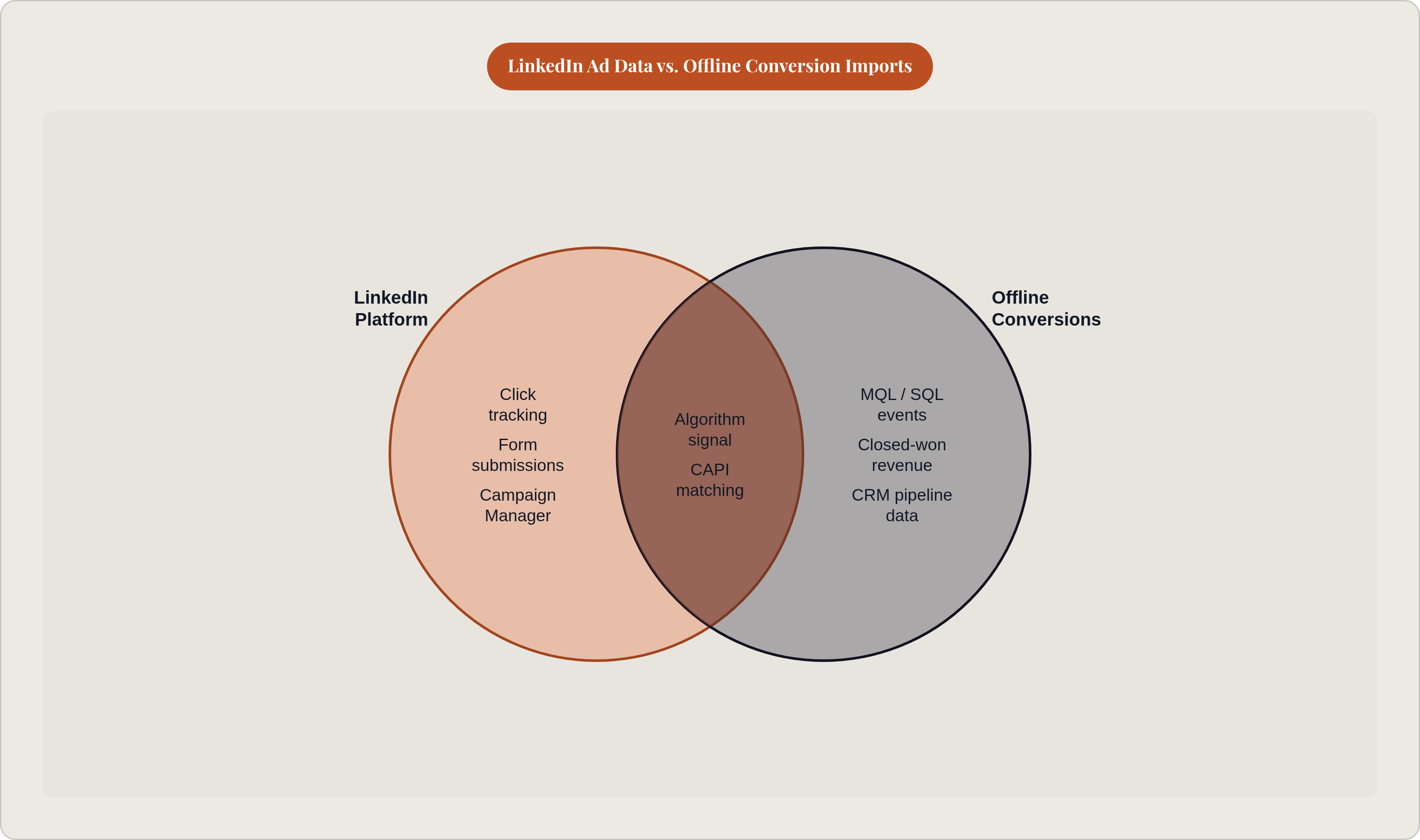
Offline conversions fix that by sending pipeline events that live in your CRM (MQL handoff, SQL, opportunity, closed-won) back to LinkedIn after the fact. LinkedIn calls these "imported conversions" because they come from outside the platform: a server, a partner tool, or a plain CSV file you upload yourself.
There are three ways to get the data in:
- Manual CSV upload. No developer needed, and you control exactly what's in the file. The tradeoff is speed: it can take 24-48 hours, sometimes closer to a week, before the data shows up in Campaign Manager.
- Conversions API (CAPI). Data streams in continuously, close to real time. This is the setup you want if you're running any real volume.
- Insight Tag plus CAPI together. LinkedIn recommends this combination for the fullest picture.
The matching depends on something called lifatid, a click identifier LinkedIn attaches to the URL when someone clicks your ad. If your landing page captures that ID and stores it in the CRM at the moment of the click, LinkedIn can later match a CRM event, say, an opportunity created three months from now, back to the exact campaign and creative that started it. If that ID was never captured, LinkedIn falls back to matching on email address alone, which works, but at a lower match rate and with a weaker signal.
Cadence matters too. Daily or weekly imports keep the signal fresh. Batch uploads that happen once a month or less let the signal go stale, and a stale signal teaches the algorithm less.
That's the mechanical layer. What makes it useful or useless comes down to how you configure each piece on top of it.
The five pipeline events worth mapping and how conversion value weights them
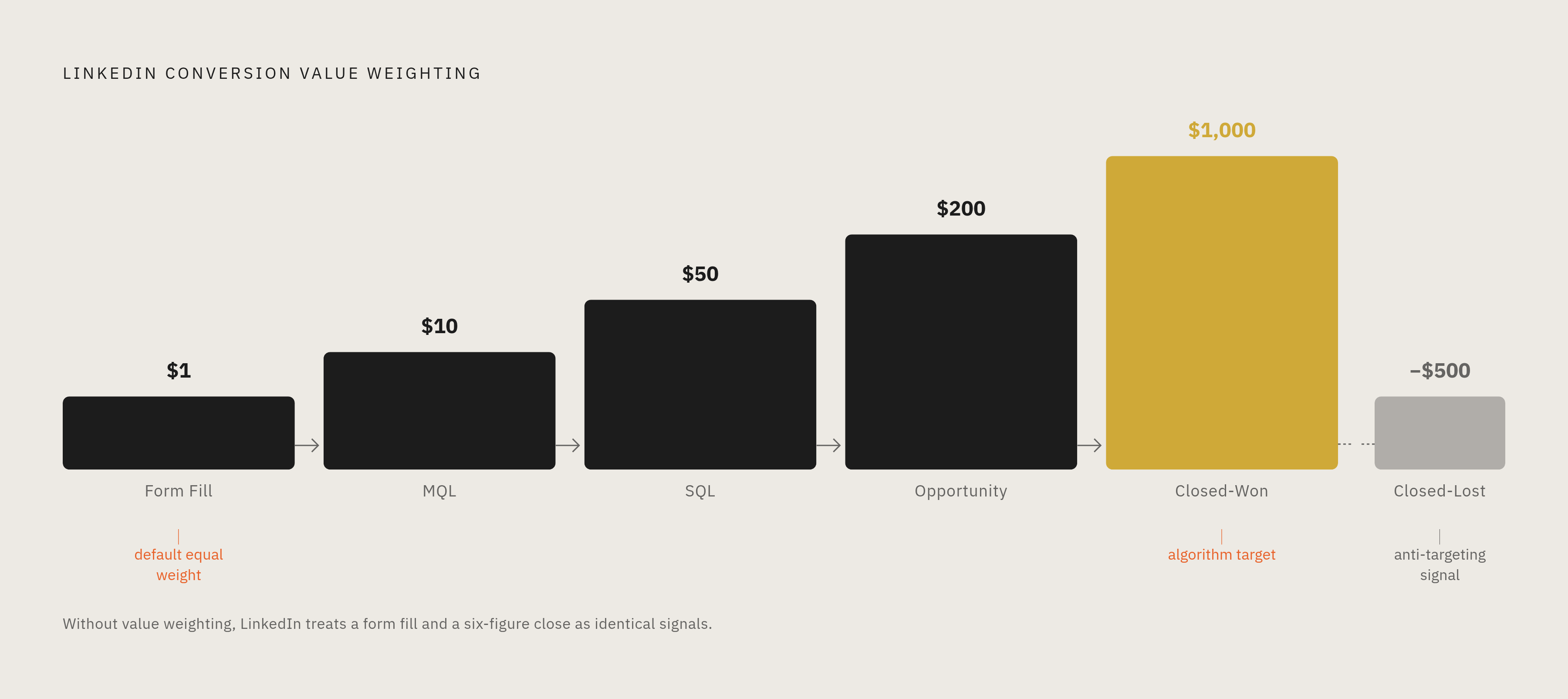
In practice, five stages map cleanly to LinkedIn conversion events: form fill, MQL, SQL, opportunity, closed-won. Each one gets its own conversion event set up in Campaign Manager.
Here's the part people skip: assigning a dollar value to each event. Do that, and you change what the algorithm is chasing. Weighted by value, LinkedIn will start hunting for audiences that look like your closed-won deals, not audiences that just look like people who fill out forms. Skip the values, and LinkedIn treats every event the same, a form fill and a six-figure closed deal carry equal weight in its eyes. That's backwards, and it's the default state of most accounts.
For mature programs, there's a sharper move: sending closed-lost events with negative values. That tells LinkedIn to actively avoid audiences that resemble your worst leads, a kind of negative targeting built from your own outcome data rather than a guess.
The general rule: the further downstream the event you optimize toward, the closer the algorithm gets to actual revenue. But that only works if you have enough of those downstream events for LinkedIn to learn from, which is the next problem.
Sequencing these events also gives you something reporting-side: real stage-to-stage conversion rates tied to LinkedIn specifically, not just a top-of-funnel cost-per-lead number that tells you nothing about quality.
Why the algorithm can't perform until it has enough signal — and what enough means
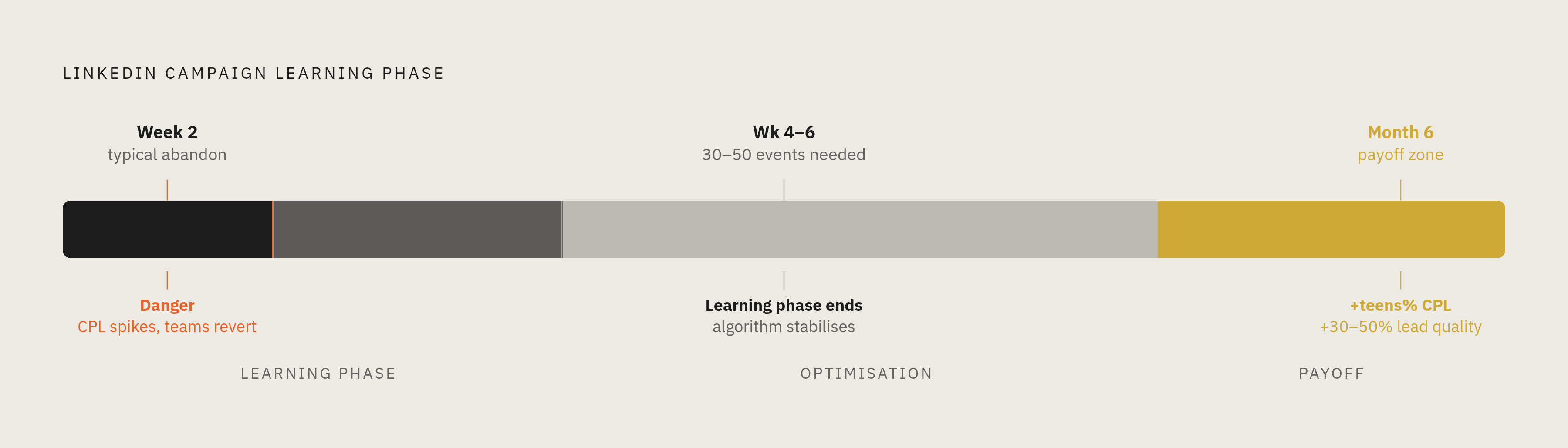
LinkedIn's automated campaigns need 30-50 conversion events before they exit the learning phase and start optimizing well. That learning period takes at minimum four to six weeks. Pull the campaign or restructure it before then, and it never reaches the state the whole setup was built for.
Most teams give up in week two. Cost per lead looks worse than before the switch, so the instinct is to revert. But that's the learning phase doing exactly what it's supposed to do, not a sign the setup failed. It's an easy trap, because the early numbers look like a mistake instead of a phase.
This affects which event you should actually optimize toward. If you only close a handful of deals a month, closed-won volume will never hit 30-50 events fast enough. In that case, optimize toward an earlier, higher-volume stage, opportunity or SQL, while still passing closed-won data through for reporting. The right target is the furthest downstream event that still generates enough volume to clear the learning phase in a reasonable window.
Programs that survive the training period report meaningful gains at the six-month mark: cost-per-lead improvements in the mid-to-high teens percentage-wise, and lead quality improvements as high as 30-50%. But those numbers only belong to the programs that didn't panic and pull the plug at week two. Whoever manages the account needs to know, in advance, not to touch it during this window. Every well-meaning "optimization" resets the clock.
Three setup failures that break match rate before a single event is imported
Match rate is the percentage of imported records LinkedIn can tie back to an actual ad click. It's the ceiling on how much signal reaches the algorithm at all, and it gets broken in three common ways, often before anyone realizes it.
Failure one: lifatid never gets captured. If your landing page form doesn't pass that click ID into a CRM field at the moment of submission, it's gone. There's no retroactive fix. This is a landing page and CRM configuration issue, not an import issue, and it needs to be caught before launch, not diagnosed after the fact. In one connector comparison, a third-party connector matched 73% more SALs than Salesforce's native connector, and 15% more than a native marketing ops connector. The tool you use to pass click IDs through has a real, measurable effect on match rate.
Failure two: messy lifecycle stage definitions. If your CRM's definition of MQL, SQL, and Opportunity has drifted, gets manually overridden, or has no clear progression rule, then the event you're importing isn't what its label says it is. A CRM hygiene check has to happen before you touch LinkedIn's settings, not after. Garbage stage definitions produce garbage signal, no matter how clean the technical import is.
Failure three: an attribution window shorter than the sales cycle. LinkedIn's default offline attribution window is 30 days. If your sales cycle runs three to nine months, nearly all of your closed-won events happen outside that window and never get credited to LinkedIn at all. Set the window to 90 days, the longest offline attribution window LinkedIn supports. Some third-party tools work around the limit by syncing intermediate stage events (MQL, SQL) within the window instead of waiting to sync the final outcome.
These three failures don't depend on each other. You can fix one and still get taken out by either of the other two.
The tool decision: manual CSV, native CRM integrations, or a dedicated CAPI partner
Manual CSV makes sense for low volume or a proof-of-concept test. It doesn't hold up in production. The delay eats into the freshness of your signal, and the process doesn't scale past a handful of campaigns.
Native CRM connectors, the built-in options from HubSpot or Salesforce, are lower effort to set up. But the match rate evidence points against them. Salesforce's native connector, in a direct comparison, matched significantly fewer attributed events than third-party alternatives. Native connectors make sense when simplicity matters more to your team than squeezing out every point of match rate.
Dreamdata is LinkedIn's most sophisticated official CAPI partner, built specifically for B2B attribution across the full customer journey. It maps a buyer's path from an anonymous first website visit all the way to closed-won, across LinkedIn, Google, and other channels, then pushes that pipeline and revenue data back to LinkedIn automatically. You can choose your attribution model (first-touch, last-touch, linear, time-decay), and the attribution window extends to 180 days or more, which matters a lot for long B2B cycles. Setup typically takes two to three weeks and doesn't need a data engineer. LinkedIn and Dreamdata report that CAPI adoption through the tool cuts cost-per-acquisition by 20% and increases attributed conversions by 31%. Pricing starts at $750 a month for the paid tier; there's a free plan, but it only covers company identification.
Factors.ai sits at the intersection of LinkedIn attribution and account-based marketing. It connects LinkedIn ad impressions to pipeline using view-through models and syncs CRM data through CAPI. The setup is point-and-click: connect your CRM, pick the stage you want to sync, choose your conversion types, done. It also includes features like frequency caps that adjust based on attribution data.
The real decision comes down to a few questions: how long is your sales cycle, what CRM are you on, do you need attribution beyond LinkedIn alone, and does your team care more about match rate or about keeping things simple? If you're running Google and LinkedIn campaigns at the same time, look for a tool that handles both channels' offline imports from one shared set of pipeline data. Running two separate setups for two channels doubles your maintenance work for no real benefit.
What LinkedIn can now tell you that it couldn't before — and what it still can't
Once offline conversions are running correctly, a few things become visible that weren't before:
- Cost per SQL and cost per opportunity, broken out by campaign, ad format, and audience segment, instead of just cost per form fill.
- Which targeting dimensions, job title, seniority, company size, actually produce pipeline that closes, versus which ones just produce leads that enter the funnel and stall.
- Real stage-to-stage conversion rates for LinkedIn specifically, which lets you make budget calls based on pipeline instead of cost-per-lead.
- Closed-won revenue tied back to LinkedIn spend, even when the deal closes months after the original click.
There's also a separate benefit worth naming directly: even if nobody on your team ever opens a report, the downstream signal makes LinkedIn's automated bidding smarter on its own. The reporting gain and the algorithm gain aren't the same thing, and they add up rather than replace each other.
But it's worth being honest about what this doesn't fix. Offline conversions don't solve multi-touch attribution. If a prospect clicks a LinkedIn ad, then a Google search ad, then converts through a sales email, offline imports will show you LinkedIn's role, but they won't settle the argument over which channel actually gets the credit. They also don't track the buying committee. The person who filled out the form and the group of stakeholders who actually influenced the deal, often eight to thirteen people on a complex B2B purchase, aren't the same record in your CRM. And they're blind to the dark funnel: LinkedIn impressions that shaped how someone thought about your company without ever getting a click.
So offline conversion imports close the pipeline attribution gap on LinkedIn. They don't answer the bigger multi-channel attribution question. That needs a separate layer, an attribution tool sitting above all your channels, not just this one.
How this measurement layer changes budget and creative decisions in practice
Before offline conversions, budget follows cost per lead. That optimizes for form-fill volume, full stop, with no regard for what those leads turn into.
After offline conversions, budget can follow cost per SQL or cost per opportunity instead. Some campaigns that looked expensive on cost-per-lead turn out to be the cheapest per opportunity. Others that looked efficient on the surface turn out to produce leads that never go anywhere.
Creative decisions get sharper too. Research on B2B campaigns has found that branded campaigns tend to deliver a higher return than generic, product-focused ones. Without pipeline-level attribution, though, you can't confirm whether that pattern holds through to closed-won in your specific market, you're just trusting a general finding instead of testing your own data.
Audience pruning becomes possible too. If a job-title segment keeps producing SQLs that stall at opportunity and never close, offline data surfaces that pattern clearly. You can exclude that segment or lower bids on it, something cost-per-lead data alone would never tell you to do.
Bid strategy shifts as a result. Once pipeline events are the optimization target, you can set LinkedIn's automated bidding toward maximum delivery or a target cost-per-acquisition on a real business event, not a form fill. The algorithm is now working toward something the business actually cares about.
And the conversation with leadership changes shape. Instead of "we generated 400 leads at a low cost each," it becomes "we sourced 40 opportunities at a higher cost each, worth millions in pipeline." That's the framing that keeps budget flowing.
The longer this runs, the better it gets. Each new campaign starts with a growing body of evidence about which audiences and creative actually produce closed revenue, instead of starting from zero every quarter.
What a correctly maintained offline conversion setup requires on an ongoing basis
Match rate doesn't stay fixed once you set it up. A new landing page that forgets to pass lifatid, a CRM field that gets renamed, a form that gets rebuilt, any of these can quietly break click ID capture with no error message anywhere in Campaign Manager. Nobody gets a warning. You just find out months later when match rate has quietly dropped.
CRM stage definitions need active governance too. Sales processes change. An SQL in January doesn't always mean the same thing as an SQL in October if nobody's keeping the definition consistent, and that drift corrupts the signal LinkedIn is learning from without anyone noticing.
Attribution windows need periodic review as well. Deal cycles shift over time, enterprise buying cycles in particular tend to run longer than mid-market ones, often by two or three months. As that shifts, your window setting and your optimization target may need to move with it.
Protecting the learning phase is an ongoing discipline, not a one-time rule. Any major campaign change, a new audience, a new objective, a big budget shift, can restart the learning clock. Changes need to be planned and spaced out, not made reactively every time a number looks off.
And import cadence needs monitoring. A missed week on manual uploads quietly degrades how current your signal is. Automated CAPI connections should have failure alerts built in, because a silent break is worse than an obvious one.
The failure pattern I see most often: a team treats offline conversion setup as a project, hands it to a contractor, gets it running, and never looks at it again. It's not a project. It's closer to a garden. Leave it alone long enough and it stops doing what you built it to do. Thunder, an applied-AI company whose agents run Google and LinkedIn Ads end to end for sales-led B2B teams with human experts accountable for outcomes, is one option built around continuous execution rather than a handoff-and-forget model.