Predictive Lead Scoring Models for LinkedIn-Sourced Leads
Custom models built for LinkedIn's signals beat generic lead scoring tools on the platform.

This is about building a lead scoring model that actually works for LinkedIn leads, instead of bolting LinkedIn data onto a model that was built for website visitors. Most predictive scoring tools were trained on page views and form fills. LinkedIn leads don't behave that way, and if you score them like they do, you're going to bury your best prospects under a pile of junk.
Here's the thing nobody tells you upfront: nearly 80% of B2B social leads come from LinkedIn. That's not a rounding error. That's the majority of your social pipeline, and if your scoring model treats it as an afterthought, you're misjudging most of what comes in.
The LinkedIn signal set that actually predicts conversion
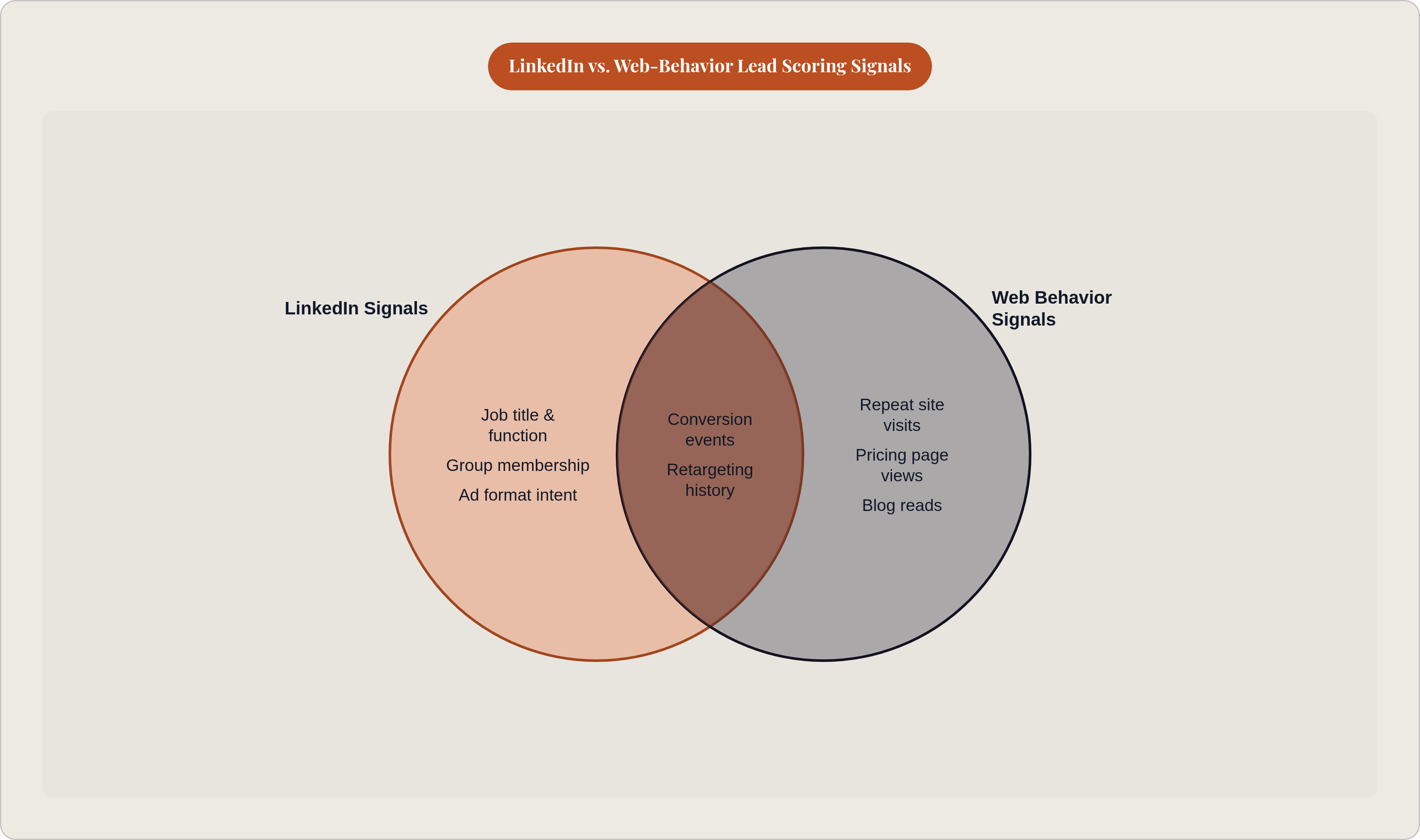
Let's start with what a web-trained model looks for. Repeat site visits. Blog reads. Time spent on the pricing page. Makes sense, right? Someone who visits your pricing page five times is probably closer to buying than someone who read one blog post.
But what happens when a VP of Sales fills out a LinkedIn Lead Gen Form and never touches your website at all? A web-behavior model sees... nothing. No pricing page visit. No repeat sessions. By that model's logic, this VP looks cold. Except she's not cold. She's just interacting with you on a different platform, one with its own rules.
That's the blind spot. LinkedIn leads carry two kinds of signal that most models ignore completely: identity signals and engagement signals.
Identity signals are about who the person is:
- Job title and function. Not just "how senior," but what they actually do. A Director of RevOps and a Director of Facilities are both "Directors," but only one of them is in your buying group.
- Seniority level. Director and above usually means budget authority in B2B deals. Below Manager, rarely.
- Company size. A VP at a 20-person startup and a VP at a 2,000-person company are not the same lead. Not close.
- Industry. LinkedIn's taxonomy is a little sloppy, but it's usable once you map it to your own ideal customer list.
- Geography, when territory or compliance rules apply.
- Group membership and followed topics. This one's underused. It's a quiet signal of genuine professional interest, and most teams don't even look at it.
Engagement signals are about how someone interacted with you:
- Ad format of first touch. A Lead Gen Form completion signals more deliberate intent than a click on Sponsored Content. A Message Ad reply is different again.
- Content type. Did they engage with a product demo ad, or a thought-leadership piece? One is closer to a buying decision than the other.
- Touch sequence. One-touch LGF completion versus a slow crawl through five pieces of content over three weeks. Same lead, very different story.
- Video completion rate. Someone who watches 90% of your video is a different animal than someone who watched three seconds and scrolled past.
- Message Ad response type. Reply, CTA click, or nothing at all.
- Retargeting pool membership. Was this person already warm from your website, or a cold LinkedIn audience who converted fresh?
Here's the catch: LinkedIn's Campaign Manager gives you the aggregate numbers, but not individual-level engagement history. To get that, you need the Insight Tag and Conversions API wired into your CRM. Skip that step, and you're scoring blind. Enrichment tools (Clay, Clearbit, Apollo, that category) help fill in the fields people didn't bother completing on the form.
And this engagement context, which ad, which message, which content theme, isn't neatly structured. It takes real feature engineering to turn it into something a model can use. Skip that work and you're leaving the most valuable part of the LinkedIn signal set on the table.
How to structure the training dataset for a LinkedIn-specific model
First rule: don't blend your data sources. LinkedIn-originated leads need their own training set, separate from inbound web leads, trade show contacts, and SDR outbound. Why? Because those three sources convert differently, for different reasons, on different timelines. Mixing them muddies the signal you're trying to isolate.
Defining your labels is the most important decision you'll make, and it's easy to get wrong:
- Positive label: closed-won, or an opportunity that advanced past a defined stage (SQL, Stage 2, whatever fits your pipeline volume).
- Negative label: leads that went cold, got disqualified, or churned before an opportunity was even created.
- The messy middle: leads still sitting in nurture. Leave them out of training entirely. Don't force them into a bucket they don't belong in.
How much data do you need before this is even worth doing? Roughly 500 closed deals is the floor most practitioners point to for reliable modeling. Below that, use rules-based scoring instead and start banking labeled data now. There's no shortcut here. You need the volume, or the model is just guessing with extra steps.
Once you've got the data, the feature engineering is where the LinkedIn-specific work happens:
- Normalize job titles into tiers (IC, Manager, Director, VP, C-suite) and function buckets. Raw title strings are too messy to use as-is; "Head of Growth" and "VP Growth Marketing" need to land in the same bucket.
- Encode company size as bands, not raw headcount. 1-10, 11-50, 51-200, 201-1000, 1000+. The order matters more than the exact number.
- Encode ad format as a category, and build a "first-touch intent score" from it.
- Derive a "content funnel stage" feature from whatever content or ad the lead engaged with: top, middle, or bottom of funnel.
- Weight recent engagement more than old engagement. A touch from 90 days ago shouldn't carry the same weight as one from last week, especially in fast sales cycles.
- Count the touches. How many LinkedIn ad interactions happened before conversion? That tells you if you're looking at a slow-nurture lead or a one-touch high-intent lead.
Pull all of this together from five places: LinkedIn Campaign Manager (via API), your CRM, the Insight Tag / Conversions API, your enrichment layer, and marketing automation if there's post-conversion nurture happening.
One more thing worth flagging: class imbalance. In most B2B pipelines, closed-won deals are a small slice of total leads. If you don't correct for that (oversampling, undersampling, class-weight adjustment, pick your method) the model will just learn to predict "never converts" for almost everyone, because that's usually right. Technically accurate, completely useless.
Choosing and training the right model architecture
A peer-reviewed study in Frontiers in Artificial Intelligence tested fifteen classification algorithms for lead scoring. The winner: Gradient Boosting Classifier. That's a useful anchor point if you're staring at a menu of options and don't know where to start.
Here's a simple way to think about your choices:
- Gradient Boosting (XGBoost, LightGBM): highest accuracy, but only once your data is clean and well-labeled. This is your default once the dataset's in order. For context, AI-driven lead scoring generally lands in the 40-60% accuracy range, compared to 15-25% for manual scoring methods.
- Random Forest: more forgiving of noisy or sparse data. Good option early on, when your enrichment coverage is still patchy. You trade a bit of accuracy for stability.
- Logistic Regression: lower ceiling, but it gives you readable coefficients. That matters more than it sounds like it should, because when a sales VP asks "why did this lead score high," you need an answer that isn't a shrug.
What about neural networks? Skip them. The Frontiers study found they add complexity without a real accuracy payoff for datasets the size most B2B teams are working with. Save that firepower for a much bigger, messier dataset than the one you've got.
A few training rules worth following closely:
- Split by time, not randomly. Train on older leads, validate on recent ones. This mimics how the model will actually be used: predicting the future from the past.
- Cross-validate within your training set to tune hyperparameters like learning rate and tree depth.
- Judge the model on precision-recall, not raw accuracy. In an imbalanced dataset, a model that just predicts "no" for everyone can hit very high accuracy and be completely worthless. AUC-PR is the metric that actually tells you something.
One underrated benefit of tree-based models: they hand you feature importance rankings for free. Use those to check your work. Are seniority, ad format, and funnel stage actually pulling weight in the predictions? If they're not, something's off, either in your feature engineering or your assumptions about what matters.
Retrain quarterly at minimum. Retrain sooner if your campaign mix shifts (new ad formats, new markets, ICP expansion). A model is not a "build once, forget it" tool. It's more like a garden.
Operationalizing scores inside the sales and marketing workflow
Here's an uncomfortable truth: a perfectly built model sitting in a data warehouse does absolutely nothing. Zero. It only matters the moment a rep is deciding whether to call a lead, or a marketer is deciding what nurture sequence to enroll them in.
The score has to write back to the CRM in real time (or close to it), landing directly in the SDR's queue. No manual lookups, no separate dashboard nobody checks.
From there, build routing tiers:
- High score: route straight to an SDR or AE, with LinkedIn context attached. Which ad, which content, how many touches, how well the seniority matches your ICP.
- Mid score: structured nurture, run alongside LinkedIn retargeting. The model should tell you which nurture track fits, not just whether to nurture at all.
- Low score: keep out of the SDR queue. Watch for a score change if new engagement shows up. Don't let reps burn hours chasing low-fit leads just because the form was filled out yesterday.
Here's the part people underrate: the number alone doesn't change anyone's behavior. What changes behavior is the why. "VP of RevOps, 800-person company, completed a Lead Gen Form off a bottom-funnel ad after two earlier Sponsored Content touches" tells a rep exactly how to open that call. "Score: 87" tells them nothing.
The feedback loop matters just as much as the initial build. SDR dispositions (qualified, not qualified, wrong person entirely) are gold for calibrating the model, but only if they're captured in structured CRM fields, not buried in free-text notes nobody reads back. Closed-won and closed-lost outcomes need to flow straight back into the training set for next quarter's retrain. And if you notice high-scoring leads getting disqualified over and over, that's not noise, that's a drift signal. Time to check feature importance and see if your campaign mix moved under you.
Marketing gets value here too. Export your high-score leads back to LinkedIn Campaign Manager as matched audiences, and bid harder against lookalikes of your best-converting profile. Watch score distribution across ad sets: a campaign generating a high volume of low-score leads is a problem, even if the cost-per-lead looks great on paper. And build in score decay: if a lead goes quiet with no new engagement, their score should drop. Otherwise stale leads clog the queue forever.
Research found companies using predictive analytics on LinkedIn engagement saw a 91% jump in lead-to-close rates. Worth sitting with that number for a second. That lift didn't come from the model training alone. It came from what happens after: the routing, the sequencing, the feedback loop. Build the model and stop there, and you leave most of that value on the table.
Where the model will degrade and how to catch it early
Every model is a snapshot of the past. It learned from the campaigns, ICPs, and ad formats that existed when it was trained. Change any of those, and the model's assumptions start to crack.
Four things tend to break it:
- New ad formats. Introduce Conversation Ads when your model only knows Sponsored Content and Lead Gen Forms, and it has no history to draw on. It'll under-weight the new signal simply because it's never seen it before.
- ICP expansion. New industry, new company size band, new geography. Suddenly you've got lead profiles the training data never accounted for.
- Sales process changes. Redefine what counts as an SQL, and you've just broken the label consistency the whole model was built on.
- Seasonal and market shifts. Buying behavior moves with budget cycles and macro conditions. A model trained on one fiscal year might not hold up in the next.
So how do you catch this before it costs you pipeline? Watch these signals in production:
- Score distribution shift. If the share of top-quartile leads jumps or drops without a matching change in pipeline quality, something's drifting.
- SDR disqualification rate on high scores. This is your earliest warning that the model's idea of "good" has drifted from what sales sees on the ground.
- Conversion rate by score band, checked monthly. Top-quartile leads should keep converting at a higher clip than everyone else. If that gap starts to close, the model is losing its edge.
- Feature importance stability. Recheck this at every retrain. If LGF format suddenly matters less than it used to, ask why. Did your campaign strategy change without anyone updating the model?
Retraining isn't a maintenance chore you do to keep the lights on. It's the whole point. Every closed deal you add to the training set makes the next version of the model a little sharper than the last. That's the compounding part, and it's the reason this works better over time instead of worse.
Treat the model as a one-time build, and the score as a fixed output you never touch again, and you'll watch the accuracy quietly erode. Not because the model failed. Because the world it was trained on stopped existing.