CRM Integration with LinkedIn Campaign Manager for Pipeline Reporting
All three layers are required for accurate pipeline reporting and revenue attribution.
CRM integration with LinkedIn Campaign Manager isn't one connection you flip on. It's three separate layers, each doing a job the others can't, and pipeline reporting only works when all three are running. Most teams have one, maybe two, which is why the data always looks a little off.
Here's the setup: LinkedIn Campaign Manager, by default, shows you last-touch data inside a fixed time window. But a typical B2B buying journey runs about 272 days and involves roughly 88 touchpoints, per Dreamdata's 2026 LinkedIn Ads Benchmarks Report. A last-click window catches almost none of that.
So what shows up in your dashboard? Form fills. Clicks. What doesn't show up? View-through influence, what happens after the form gets submitted, and whether any of it turned into closed-won revenue. Most B2B teams still run single-touch or basic multi-touch models, working from the least complete picture available.
That gap costs money. A $150 lead that turns into a high-value deal looks expensive right up until the moment you can actually see it close. Marketing and sales arguing over what "qualified" even means stretches out the sales cycle, and bad attribution is a big part of why. CFOs notice, too: Anteriad found that marketers whose reporting doesn't line up with finance priorities face heavier spend scrutiny, and a chunk of them get their budgets cut for it.
Fixing this takes three layers, each built for a different piece of the journey.
The three-layer architecture and what each layer actually does
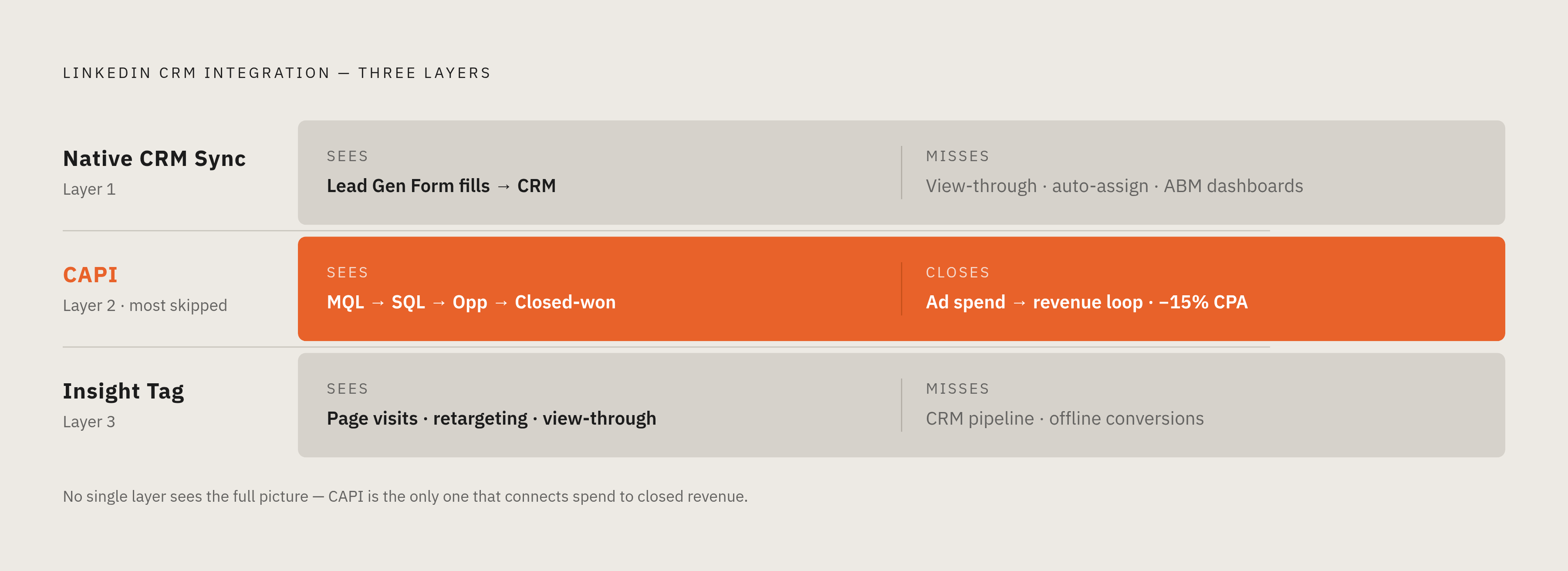
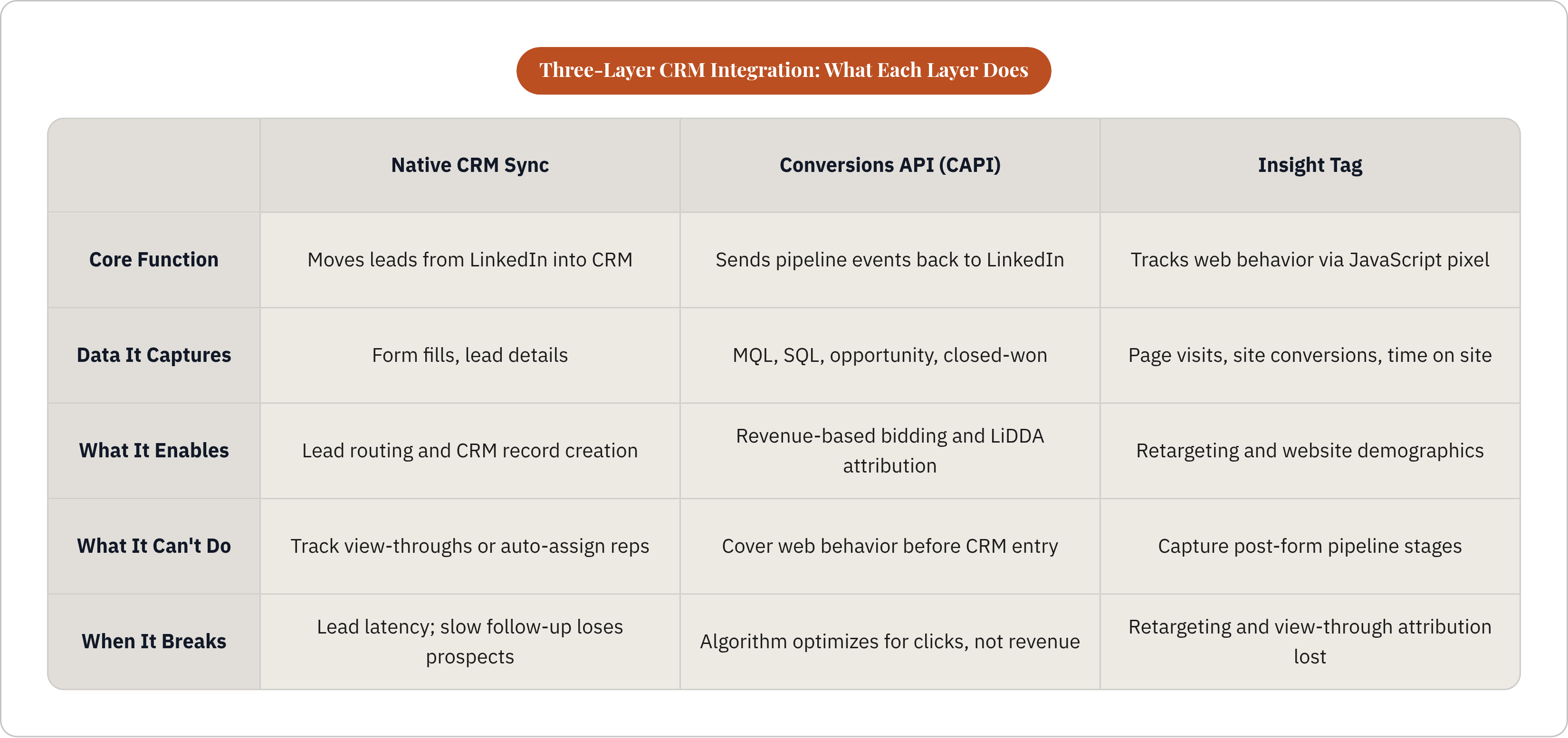
Layer 1: Native CRM sync. This moves leads from LinkedIn Lead Gen Forms into your CRM. Salesforce and HubSpot have the deepest connections through LinkedIn Sales Navigator; Pipedrive, Zoho, and Microsoft Dynamics 365 are also supported through LinkedIn's Marketing Partner Directory. Lists usually take under 48 hours to process, sometimes up to a week.
What it skips: showing companies that viewed the ad without clicking or filling out a form, assigning leads to reps automatically, or providing a built-in ABM dashboard. It's a mail carrier, not a strategist.
Layer 2: Conversions API (CAPI). This is the layer most teams skip, and the one that closes the loop. CAPI is a server-to-server connection between your CRM and LinkedIn's ad servers, no browser or cookie involved. It sends events like MQL, SQL, opportunity, and closed-won back to LinkedIn, letting LinkedIn optimize for revenue instead of clicks, and powering attribution outside the standard click window. LinkedIn expanded CAPI support in June 2025, and LinkedIn's own testing shows running CAPI alongside the Insight Tag can cut cost per acquisition by up to 15%.
Layer 3: The Insight Tag. A JavaScript pixel on your website that tracks page visits, time on site, and web conversions. It powers retargeting, website demographics reporting, and view-through attribution for people who visited but skipped the form. It runs in parallel with CAPI: the tag covers web behavior, CAPI covers what happens in the CRM after that, including renewals.
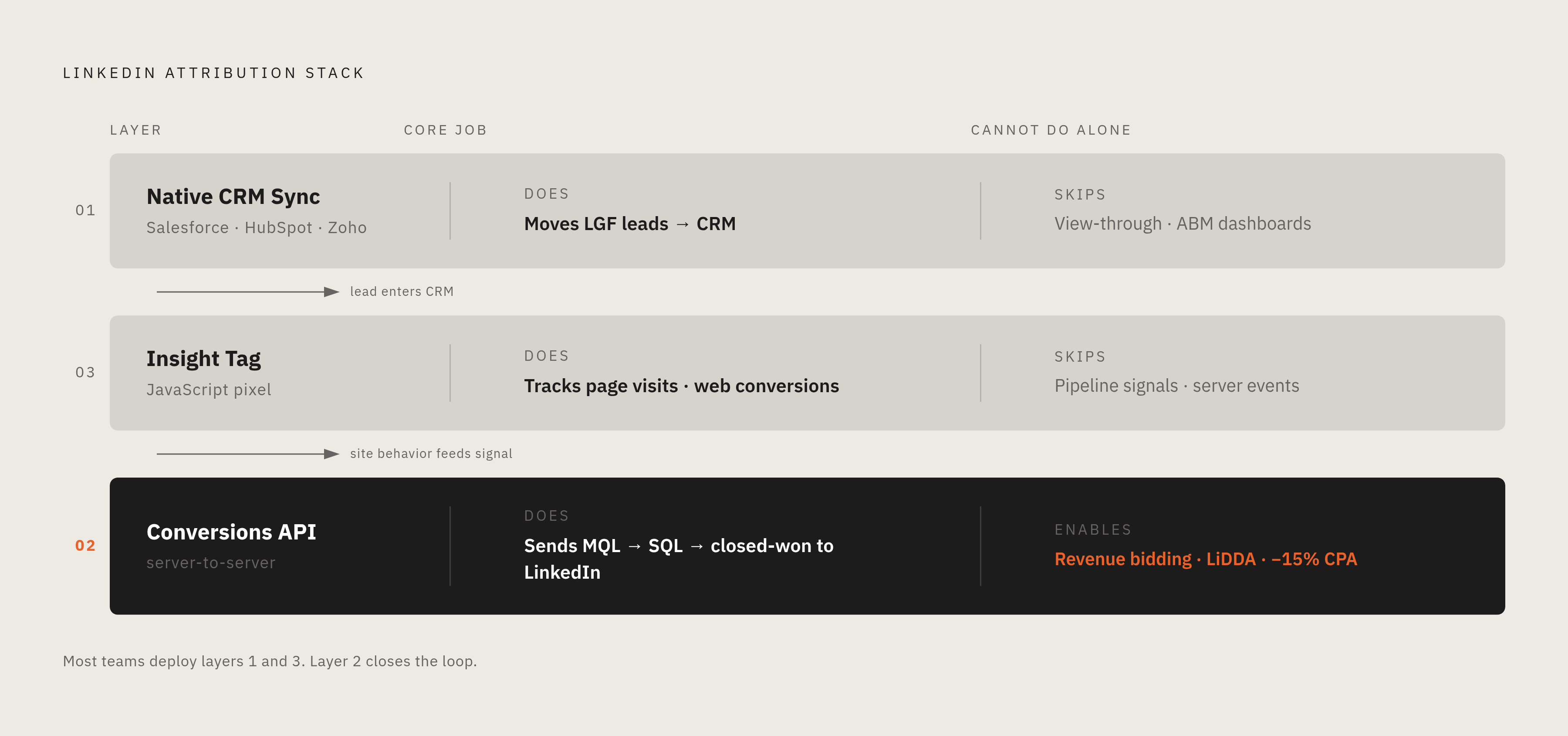
Native sync gets the lead into your CRM. The Insight Tag tells LinkedIn what happened on your site. CAPI tells LinkedIn what happened after that, in the pipeline. No single layer sees the whole picture.
What breaks when any one layer is missing
Drop the native sync, and you get lead latency. Most native integrations pull leads in hourly or daily batches, not instantly. A manual follow-up process can take 6 to 8 hours on average, and slow follow-up costs teams a meaningful share of leads. By the time a rep calls, the prospect has either forgotten what they signed up for or already talked to a competitor.
Drop CAPI, and the algorithm optimizes for the wrong thing. Without pipeline events flowing back, LinkedIn keeps chasing top-of-funnel volume: clicks, form fills, whatever moves the needle it can see. Your CPL might look great; your SQL rate stays flat, and cost per SQL creeps up while CPL looks fine — exactly the kind of report that gets misread in a budget meeting. Revenue-based bidding and LinkedIn's LiDDA (Data-Driven Attribution) model, meant to move past last-click credit, both need CAPI events to function.
Drop the Insight Tag, and you lose retargeting entirely; segmenting site visitors by the page they viewed becomes impossible. Website demographics, the report showing which companies and job titles are on your site, goes dark. Anyone who read a blog post, thought about it for two weeks, then converted through a Google search? Invisible.
Across an analysis of 300-plus B2B SaaS accounts, fewer than 15% had all three layers running. That means the large majority of teams are making budget and targeting calls on partial signal and calling it a full picture.
How to implement all three layers and what to expect during the learning period
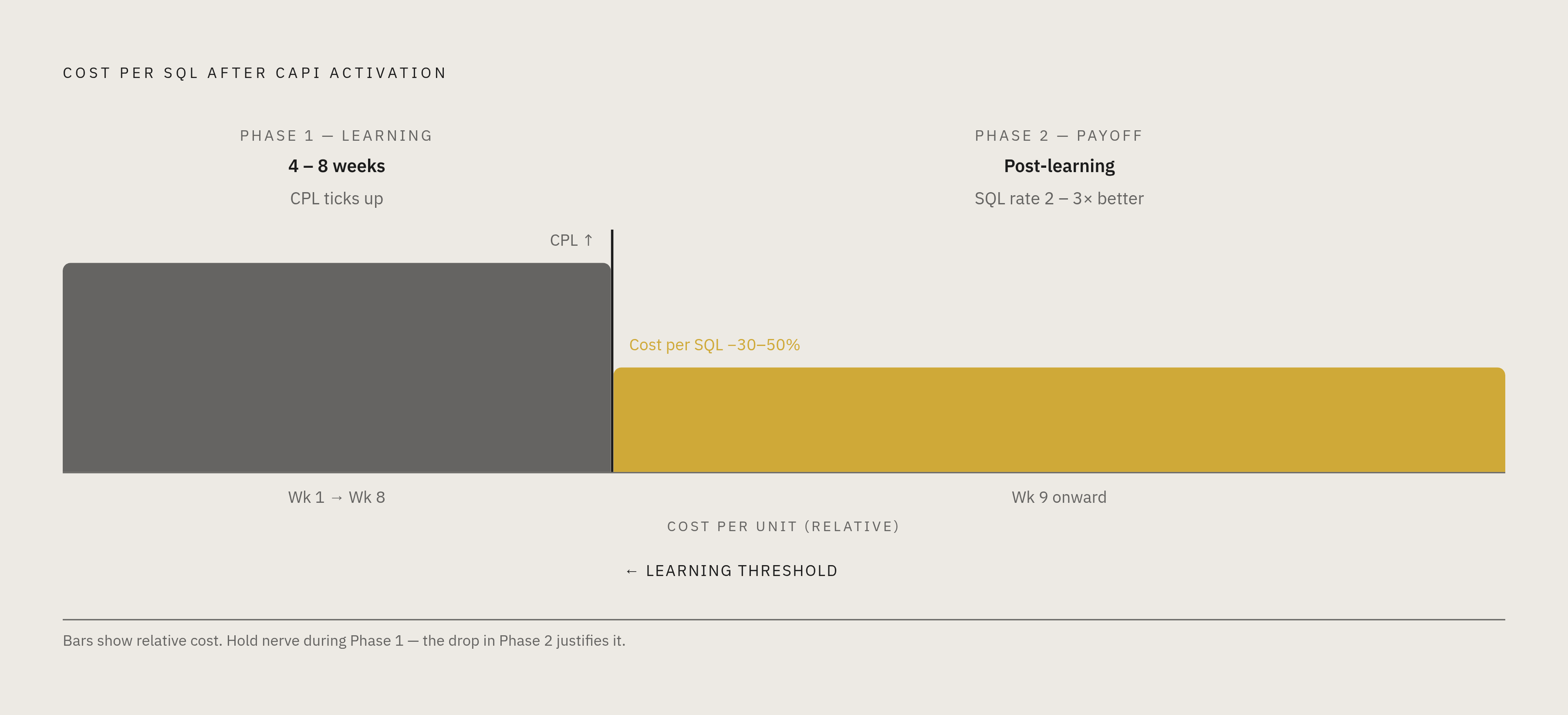
Full setup typically takes 7 to 14 days. Start with the Insight Tag: deploy it site-wide, verify it with LinkedIn's Insight Tag Helper, and confirm it fires correctly on your key conversion pages. Next, connect native CRM sync through the Marketing Partner Directory or your CRM's LinkedIn app, map your form fields to CRM properties, and run a live test submission through the whole flow. Then set up CAPI: build the server-to-server connection, decide which CRM events to send back (MQL created, SQL created, opportunity opened, closed-won), and check event match quality in Campaign Manager's Matched Audiences or Conversions section.
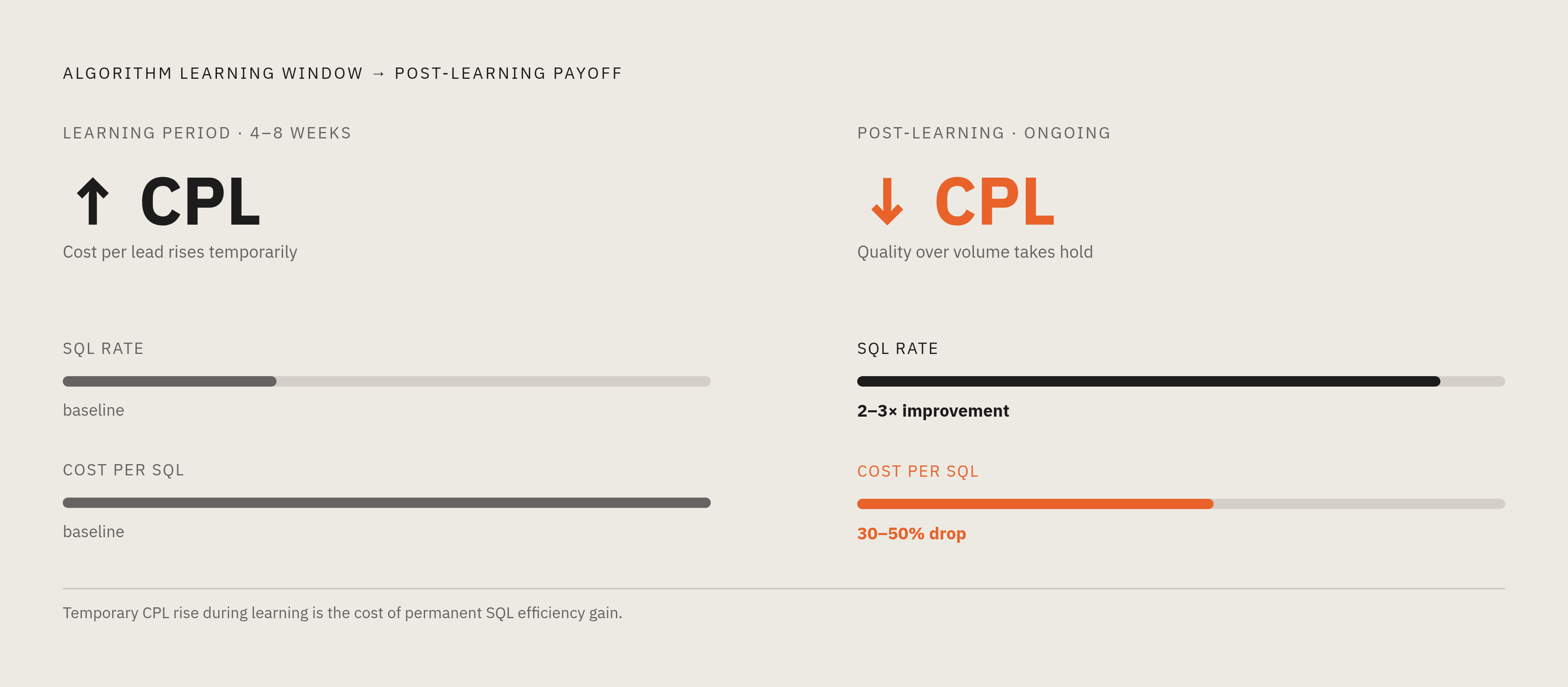
Once CAPI goes live, give it 4 to 8 weeks for LinkedIn's algorithm to learn from the new pipeline signals. CPL will likely tick up during this window — that's the algorithm shifting from chasing volume to chasing quality, not a mistake. Tell your stakeholders this before you launch, in plain terms: "CPL may rise for a month or two. We're watching SQL rate and cost per SQL, not CPL." Say it early, or you'll be explaining it defensively later.
After the learning period, the numbers usually turn. SQL rates commonly improve 2 to 3 times over. Cost per SQL often drops 30 to 50%. The algorithm shifts away from bidding toward "anyone who fills out a form" — it targets the profile of people who actually become pipeline.
One more thing that matters more than it should: which CRM events you send back. Sending only MQL data gives LinkedIn a much thinner signal than sending SQL or closed-won. Best practice is to send multiple stages so LinkedIn can build a model of the full path, click to revenue. And before any of this gets built, get marketing and sales in a room and agree on what MQL and SQL actually mean. If that definition is fuzzy, every metric downstream inherits the fuzziness.
The reporting layer that the integration enables but doesn't build automatically
Once all three layers are running, Campaign Manager gets a lot more useful. You can see pipeline-stage attribution: which campaigns are generating SQLs and opportunities, not just form fills. You can see view-through influence: accounts that saw your ads before converting through a different channel entirely. Website demographics show account-level engagement, who's on your site and what they're reading. And LiDDA can distribute credit across the buying journey instead of dumping it all on the last click, but only if it has CAPI events to work with.
The honest limit: Campaign Manager still can't see across channels. What Google Ads, email, or a conversation on Slack contributed to a deal stays invisible to it. That's where third-party attribution tools like Dreamdata, HockeyStack, or SegmentStream come in. They sit above the platform layer and tie activity across every channel to pipeline creation, deal speed, and closed revenue. Self-reported attribution, the simple "how did you hear about us?" field on a demo request form, catches the stuff no pixel ever will: a podcast mention, a friend's recommendation, dark social. The strongest setup pairs multi-touch attribution for channel-level budget decisions with self-reported attribution for the qualitative story numbers can't tell.
What the full stack makes possible is a set of metrics you can actually defend in a budget review: source-attributed pipeline (LinkedIn-sourced vs. LinkedIn-influenced vs. no LinkedIn touch at all), cost per SQL broken out by campaign and audience, and pipeline velocity by source — do LinkedIn-sourced deals close faster or slower than deals from other channels? Demand Gen Report's 2026 Demand Generation Benchmark Survey centers on sourced revenue, influenced pipeline, and customer expansion, not clicks or form fills.
It also extends into ABM. Account-level engagement (impressions, clicks, site visits) can feed into CRM as an account score. Some ABM tools will automatically route an account to a BDR once engagement crosses a set threshold, so sales knows exactly who to call and when, without someone manually combing through a dashboard. Teams running this well aim for under 4 hours between a buying signal and a rep making contact.
How integrated data compounds over time rather than resetting each campaign
A disconnected LinkedIn program resets itself every time you launch something new. Audience learning starts over. Creative testing starts over. Bidding optimization starts over. There's no memory of which audiences actually turned into revenue last quarter.
A connected program keeps a history. It remembers which job titles, at which company sizes, in which industries converted to SQL. It remembers which creative brought in pipeline-quality leads versus leads that just padded a volume number. It remembers which landing page variant produced a higher opportunity rate. None of that gets thrown away between campaigns; it compounds.
The algorithm compounds too. As LinkedIn accumulates more matched CRM events, especially closed-won data, its targeting model narrows toward the actual profile of your buyers, not just people who look like they might click. Matched audiences built from CRM contacts stay current automatically as your CRM updates, so you're targeting your real, current ideal customer profile instead of a list exported six months ago.
None of this runs itself, though. If your CRM event mapping is wrong, the optimization is wrong, full stop. No dashboard tells you whether a slump is a creative problem, a landing page problem, an attribution gap, or a targeting miss. That takes a person looking at the full picture and making a call. Same with the messy stuff: a CPL spike after a creative refresh, an audience that's run dry, a conversion event that quietly stops firing. Someone has to own catching that. Thunder, an applied-AI company whose agents run Google and LinkedIn Ads end to end for sales-led B2B teams, is built around that ownership model, with Forward Deployed Marketers accountable for exactly these judgment calls.
The teams that get this right pull ahead by a wide margin. Among Anteriad's top-performing "Data Heroes" cohort, a large share significantly beat their goals, compared to a much smaller share of everyone else. And 41% of B2B marketers who can reallocate spend based on real-time performance data move fast when something's working or falling flat; the rest cite missing performance data and platform limits as the thing holding them back.
The three-layer stack is what turns LinkedIn from a line item measured in cost-per-lead into a channel measured in pipeline and revenue — the difference that separates the programs that survive a budget review from the ones that get quietly cut.


