LinkedIn Audience Targeting by Job Function vs. Job Title
Job function reaches broader audiences cheaply; job titles target precision buyers at higher cost.

Let me start with the uncomfortable truth: neither job function nor job title targeting on LinkedIn gives you a clean signal. Both options are built on a foundation that has more cracks in it than the platform's marketing materials will tell you. If you don't understand those cracks before you set up your campaign, you're essentially flying blind at a fairly expensive altitude.
Here's what's actually happening under the hood. When a LinkedIn member types their job title into their profile, LinkedIn's algorithm reads that text and infers which of roughly 26 job functions that person belongs to. They don't ask the member. They decide. So a "Senior Marketing Manager" gets filed under Marketing. An SDR gets filed under Sales. Automatically. No input required from the human whose career it is.
Job title targeting, on the other hand, pulls from the literal string the member typed. Which sounds precise. But the same role, at different companies, might be called five different things. "Head of Demand Gen" at one company is "VP Marketing" at another. "Revenue Operations Manager" at a 200-person startup is "GTM Operations Lead" somewhere else. And here's the kicker: research from LinkedIn advertising specialist AJ Wilcox suggests LinkedIn correctly classifies only about 55% of job titles. That means a meaningful slice of your title-targeted impressions are landing on misclassified profiles.
There's also a phenomenon worth knowing about called "Super Titles." LinkedIn's grouping logic can bundle junior roles, like Marketing Specialists, under a targeting category meant for Chief Marketing Officers. So your precision targeting isn't as precise as it looks.
Modern B2B roles make this worse. RevOps, Customer Success, Growth, People Operations. These roles don't map cleanly to any single one of those 26 functions. They scatter across Sales, Operations, and Support depending on how each member happened to word their title that day.
Both options have structural limitations. The targeting strategy has to work around them, not pretend they don't exist.
What each option actually trades off: reach and efficiency vs. precision and intent-matching
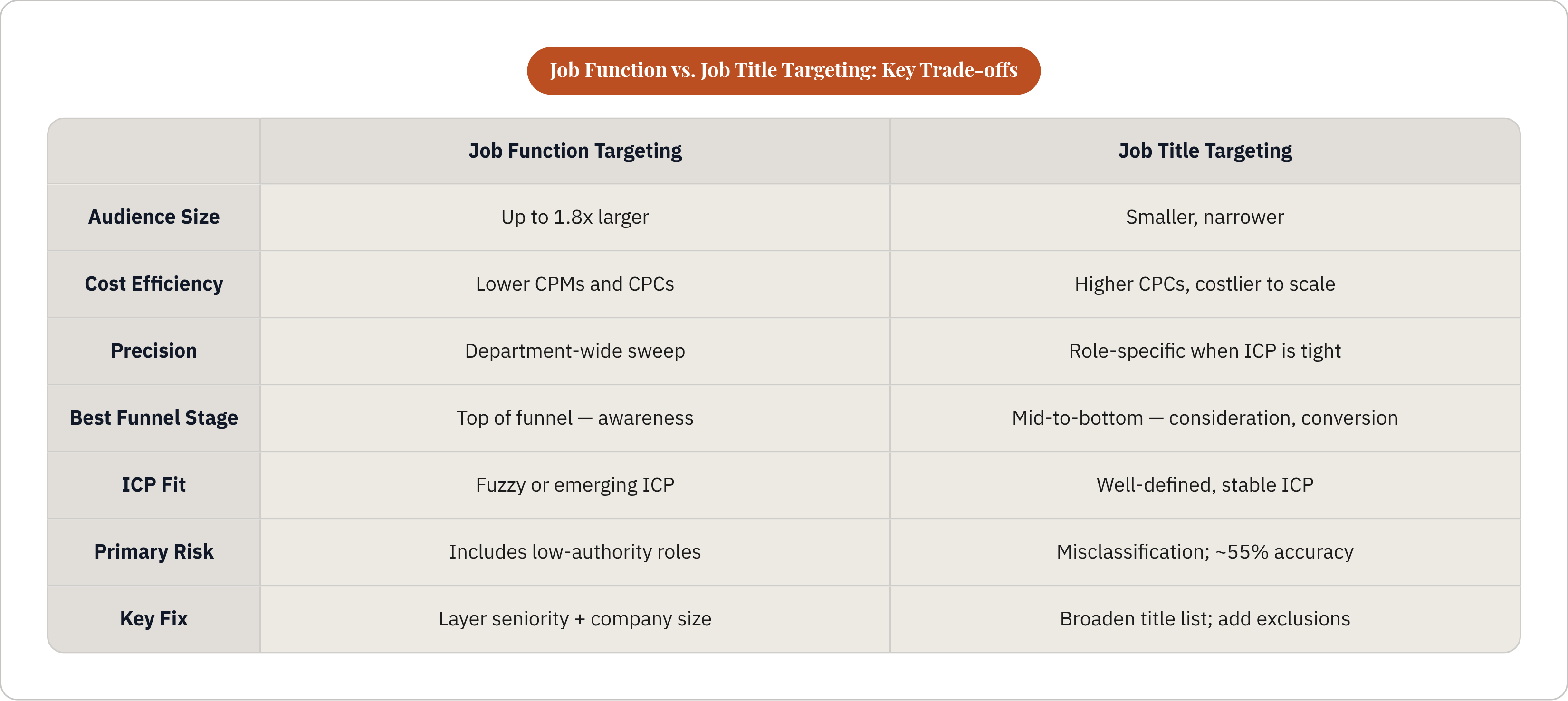
Think of job function targeting as a department-wide announcement. You're reaching everyone in Marketing, or everyone in IT. The audience can be up to 1.8 times larger than an equivalent title-based audience. That size is a feature, not a bug, when reach and cost efficiency matter. CPMs and CPCs tend to be lower because bigger audiences create less auction competition. And you don't have to spend hours building a title list. One selection covers the whole department.
The trade-off is obvious. "Everyone in Marketing" includes the coordinator who has no budget authority and the CMO who signs the contracts. That's a wide net. The fix isn't to abandon function targeting. It's to layer seniority and company size filters on top, sharpening relevance without killing reach.
Job title targeting flips those trade-offs. Smaller audiences. Higher CPCs. More expensive to scale. But when your ICP is narrow and well-defined, the precision earns its cost. A campaign aimed at Chief Revenue Officers doesn't need department-level reach. It needs to find the right people.
Worth noting: data from an aggregate of SaaS campaigns in 2024 found that title targeting combined with persona-specific messaging produced meaningfully lower cost per lead and a notably higher qualified lead rate compared to broad B2B interest targeting. The precision paid off, at scale, when the ICP was defined well enough to exploit it.
Which trade-off does your campaign actually need right now? The answer changes depending on where you are in the funnel, how clearly you've defined your buyer, and what you're trying to accomplish with this particular flight of ads.
Where each option belongs in the funnel
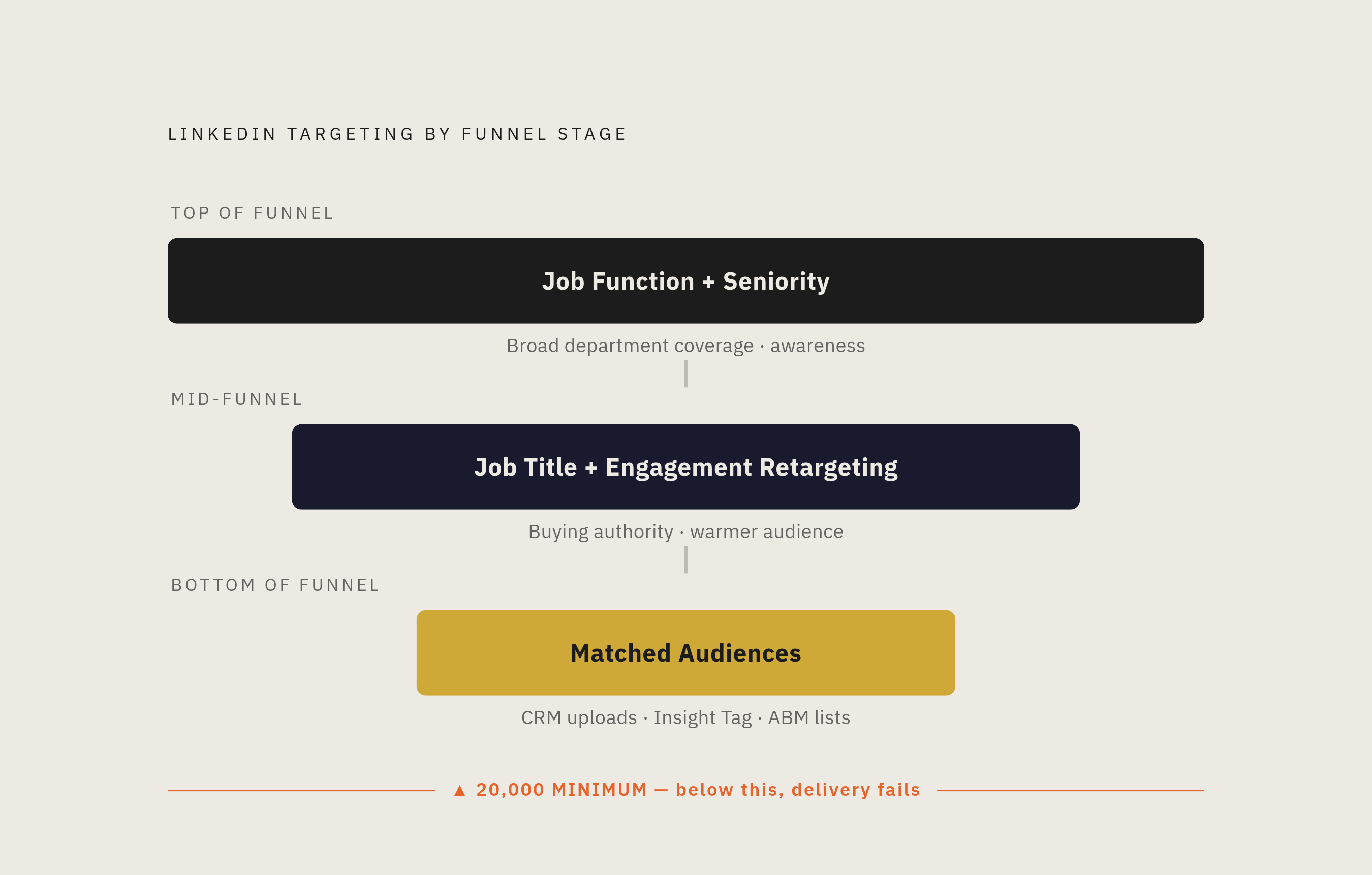
LinkedIn's own guidance points in a consistent direction: awareness campaigns call for job function plus seniority; consideration and conversion campaigns call for job title, engagement retargeting, and uploaded lists. That maps to how buyers actually move.
Top of funnel. Function plus seniority is the natural fit. You're trying to reach a broad swath of a relevant department, and you don't yet know which specific titles within that department are most likely to convert. Budget efficiency matters more than surgical precision here. Seniority trims out junior roles unlikely to influence a purchase, and function does the heavy lifting on department coverage.
One note on a tool that no longer exists: LinkedIn retired Lookalike Audiences in early 2024. If you've been reading older playbooks that reference them, that's gone. Predictive Audiences are the replacement. These are AI-generated, continuously updated audiences built from Lead Gen Form data, CRM uploads, or Insight Tag conversion events. They serve a similar awareness-expansion function, but they're trained on your actual converters, not inferred lookalikes.
Mid-funnel. This is where title targeting starts earning its keep. The audience is no longer "people in this department." It's "people with this specific buying authority or pain point." Layering engagement retargeting on top of title targeting sharpens it further. You're reaching people who already interacted with earlier content and who hold the right role. That's a meaningfully warmer audience.
Bottom of funnel. At this stage, Matched Audiences outperform both options. You're no longer reaching a profile type. You're reaching specific people already in the pipeline. CRM contact uploads and website retargeting via the Insight Tag are the primary tools. Title targeting still has a role here, but as a filter within ABM company lists, not as the primary mechanism.
One hard rule worth treating as non-negotiable: audiences under 20,000 deliver unreliably and at premium CPCs. If funnel-stage logic produces an audience that small, the answer is Matched Audiences or ABM, not a narrower title list.
How ICP definition determines which option is viable
This is where most campaigns either get it right or quietly waste budget for weeks.
Well-defined ICP. Clear buyer title, known seniority band, specific company size and industry. Title targeting pays off here. You know which roles matter. The list is finite and defensible. Precision outweighs the reach penalty.
But even a well-defined ICP needs maintenance. Titles like "Revenue Operations Manager" or "Chief AI Officer" weren't common targeting options a few years ago. Closed-won deal data from sales should drive a quarterly refresh of title lists. If the marketing team is building those lists in isolation, they're reflecting the titles marketers recognize, not the titles of the people who actually signed deals. That's a meaningful gap.
Fuzzy or emerging ICP. New market. Unclear buyer. Modern roles with no standard title convention. Job function is the safer starting point. It captures the relevant department without betting on a specific title convention that may or may not hold across company sizes and sectors.
RevOps, Customer Success, and Growth are the most common offenders here. These roles have no dedicated LinkedIn function. They scatter across Sales, Operations, and Support. Title targeting is the only reliable way to reach them, but it requires a deliberately broad title list, not a narrow one. The precision instinct will hurt you here.
One technical point that trips up a lot of experienced marketers: LinkedIn's AND/OR logic. Within a targeting category, selections work as OR. (Title A or Title B.) But between categories, selections work as AND. (Title AND Seniority AND Company Size.) Adding a title list AND a job function AND seniority in the same ad set means a member must satisfy all three simultaneously. That's not precision. That's an audience shrinking to a size that can't spend efficiently. Understanding this prevents one of the most common ways to over-constrain a campaign before it ever runs.
Four targeting combinations that match common B2B scenarios
Rather than abstract principles, here are four combinations that tend to hold up in practice.
Enterprise SaaS targeting a technical buyer. Job Function (IT) + Seniority (Director+) + Company Size (1,000+) + Industry (Technology). Function buys the department sweep. Seniority and company size do the precision work without shrinking the audience to something unusable.
SMB SaaS with a narrow, well-understood ICP. Specific Job Titles + Company Size (50–500) + Geography. Title targeting is viable here because the ICP is tight, title conventions in SMB tend to be more consistent, and the company size filter keeps the audience grounded in the right segment.
Professional services targeting a financial or legal buyer. Job Function (Finance or Legal) + Seniority (VP+) + Company Size (200+). These departments have relatively stable title conventions, but the function approach avoids the fragmentation problem that comes with trying to enumerate every title variant for "CFO" across company sizes and industries.
ABM campaign against a named account list. Company List (Matched Audiences upload) + Job Function + Seniority (Manager+). The company list is the primary filter. Function and seniority identify the right people within those accounts. This matters for a reason Gartner's research has consistently flagged: a typical B2B deal involves somewhere between six and ten stakeholders. ABM targeting needs to choreograph across the buying committee. Multiple function and seniority combinations, not a single title collapsed to represent the whole group.
One combination worth naming explicitly as one to avoid: job title targeting alone, with no company size, seniority, or industry filter. Titles vary too widely across company types for bare title targeting to hold its shape. It's a leaky boat.
Exclusions as targeting discipline, not afterthought
For every attribute you include, the question "who needs to be excluded" belongs in the same conversation. At setup — not after launch, and not when CPCs look off.
Common exclusion categories for B2B campaigns:
- Students and entry-level seniority tiers when your ICP is Manager and above
- Competitors' employees, excluded by company name
- Existing customers, suppressed via CRM upload, to protect budget for net-new pipeline
- Irrelevant industries that happen to contain the same job functions or titles you're targeting
The budget impact of customer suppression is real. Keeping existing customers out of cold-audience campaigns can reduce wasted spend by a meaningful margin, according to the research. That's far from trivial.
The Super Titles problem also has a practical fix through exclusions. If LinkedIn is grouping Marketing Specialists under CMO targeting, the solution isn't to abandon title targeting. It's to add a junior seniority exclusion. That correction costs nothing and protects the precision you're paying for.
Exclusions matter most when you're using job function targeting at scale. The broader the audience, the more exclusions earn their place. It's not defensive housekeeping. It's part of the targeting decision.
How to use early campaign data to move from function to title (or back)
Here's where the strategy actually compounds. Or where it stagnates.
Job function targeting at the top of funnel isn't just a budget-efficiency choice. It's a discovery tool. Running function-level targeting generates impression and engagement data across a wide range of actual titles. LinkedIn Campaign Manager's demographic reporting shows you which titles engaged most. That data becomes the input for building the next title list, grounded in real audience behavior rather than ICP assumptions made in a conference room.
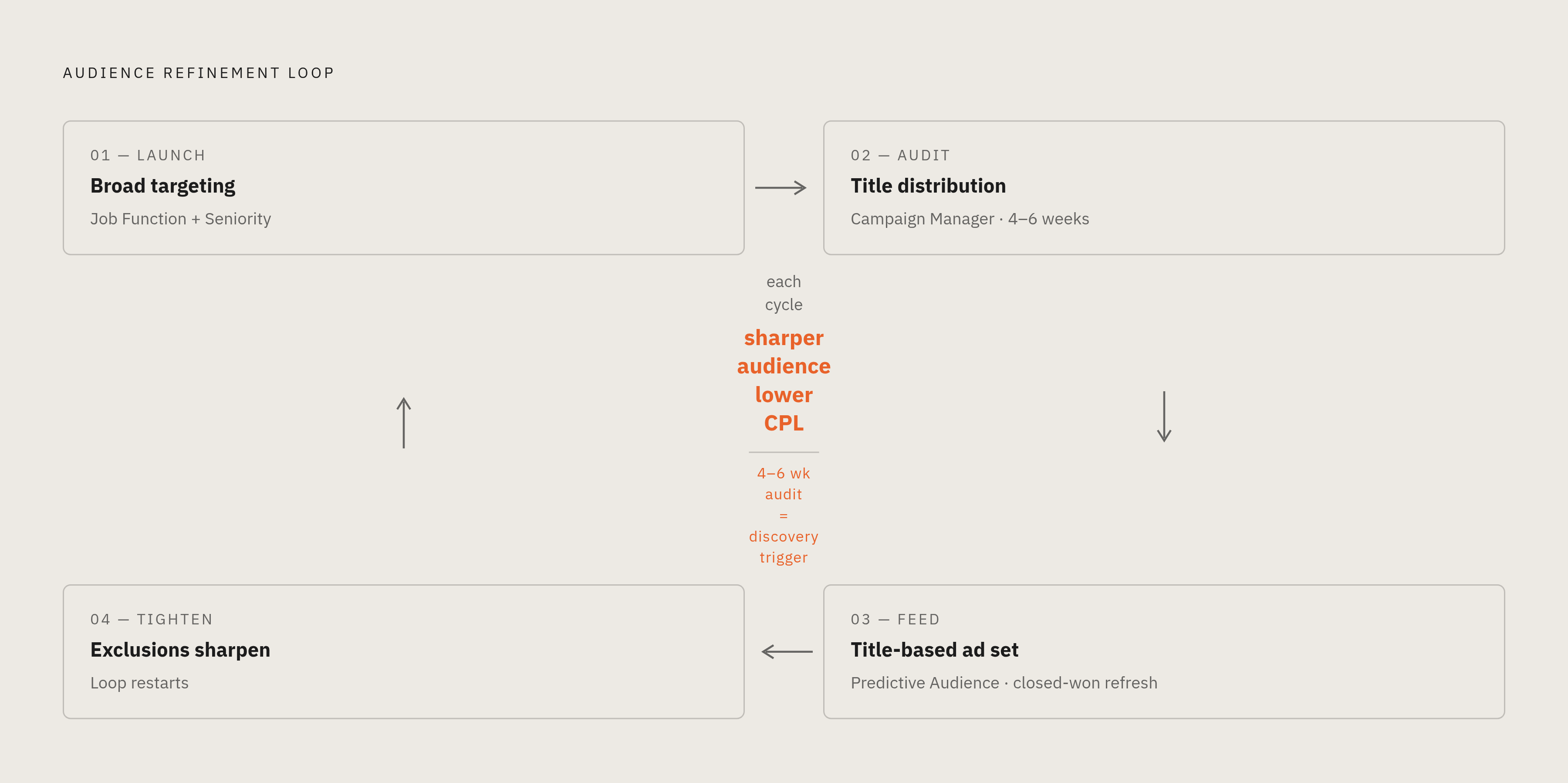
The refinement loop looks like this. Start broad with function plus seniority. After four to six weeks, audit the title distribution in your demographic report. You will find buyer titles the marketing team didn't anticipate. Those titles feed three things: a more targeted title-based ad set for the next campaign, sharper inputs for the next Predictive Audience, and a quarterly title-list refresh aligned to closed-won data from sales.
But what if the title audience that emerges from this process is too small? Below that 20,000 threshold? Teams often respond by building a narrower title list. That's the wrong direction. If the audience is too small to be efficient, Matched Audiences and ABM are the correct substitutes. More specificity is the wrong move. Different tools are the right answer.
The compounding effect is real. Each iteration — function data informing title lists, title performance informing Predictive Audiences, exclusions tightening over time — produces a progressively sharper audience that costs less per qualified lead than the first campaign did. That's not magic. It's just what happens when targeting is treated as a continuous discipline instead of a launch-time checkbox.
Teams that treat targeting as a one-time decision at launch lose this compounding advantage. The gap between those teams and teams running continuous refinement loops widens every quarter, and it's almost entirely invisible until someone asks why qualified lead rates are so different.
That's the thing about LinkedIn targeting. The structural limitations of both options are real and non-trivial. But they're workable. The teams that compound aren't the ones who found a secret setting. They're the ones who kept looking at the data after the campaign went live.