LinkedIn Matched Audiences for Account-Based Targeting
Use dynamic syncing instead of static uploads to keep your account targeting current.
The mechanics are straightforward. Upload a CSV of company names or domains. LinkedIn runs it against its database and builds a matched segment. Available for targeting in roughly 24 to 48 hours.
But there are two ways to feed that list, and the difference matters more than most teams realize.
A static CSV is the easy option. Upload once, done. The tradeoff is drift. Accounts change. Companies get acquired. New targets enter your ICP. The list doesn't know any of that. It just sits there, confidently wrong — like a map that still shows Blockbuster on every corner.
The Streaming API syncs dynamically. Once the initial processing window clears, additions and removals happen in near real-time. If your CRM is changing frequently, and it usually is, this is the better path. Manual uploads are a maintenance burden that compounds quietly. You stop noticing the rot until the match rates collapse and someone wants to know why CPL jumped.
Now, the minimums. LinkedIn requires 300 matched members before a segment can serve ads. In practice, they recommend at least 1,000 companies to give delivery real scale. Below that, you are not running a campaign so much as running a very expensive hunch.
What determines whether you hit those numbers? Match rates. And match rates depend almost entirely on list quality.
- Well-maintained lists with accurate domains can hit above 95 percent
- Stale or misformatted lists collapse into the 40 to 60 percent range
That gap is the difference between a segment that reaches your named accounts and one too thin to scale.
The company list is a container, not a complete targeting strategy. Once LinkedIn has matched your accounts, you layer professional attributes on top. Job function. Seniority. Department. That is how you get from "companies we care about" to "the right people at companies we care about."
HubSpot, Salesforce, and Marketo all have native integrations that automate the sync. The operational benefit is obvious. The strategic one gets less airtime. When your CRM is syncing directly to LinkedIn targeting, marketing and sales are working from the same account list. A prospect talking to a rep sees relevant content in their feed at the same time. That kind of alignment is usually more aspirational than real. This is one of the few places the infrastructure can actually support it.
Contact Targeting: Matching CRM Records to LinkedIn Profiles and Managing the Gap Between the Two
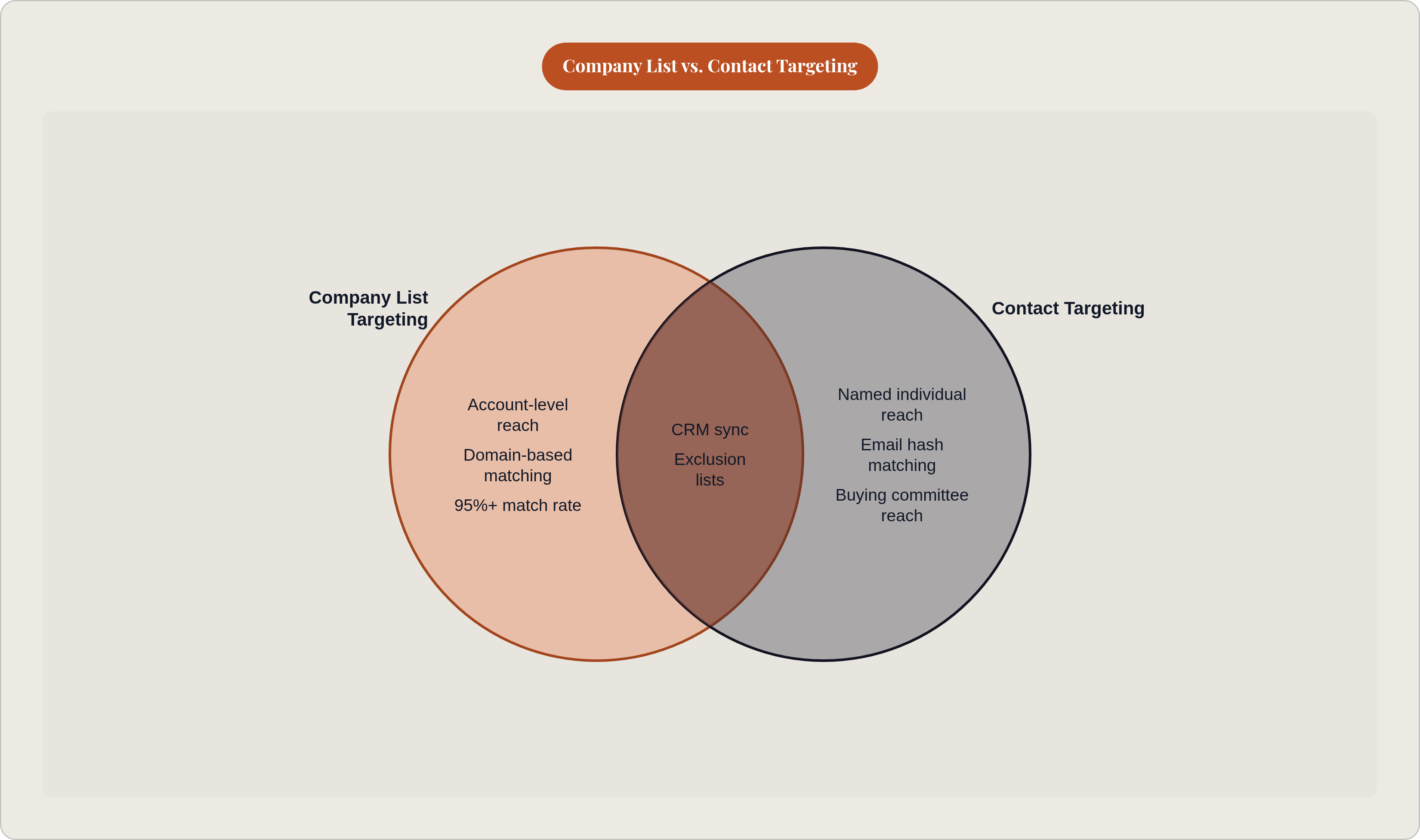
Company list targeting gets you to the right accounts. Contact targeting gets you to the right people inside those accounts. Sounds like a minor upgrade. It is not.
You upload a list of email addresses, hashed as SHA256, via CSV or Streaming API. LinkedIn matches those hashes against member profiles. Up to 300,000 hashed addresses in a single CSV.
Match rates here are more complicated than with company lists. General email lists run somewhere in the 30 to 60 percent range. B2B lists where professional emails map directly to LinkedIn accounts can push to 70 to 85 percent. The gap between those ranges is usually not mysterious. Low rates almost always trace back to two things: errors in the hashing process, and personal email addresses mixed into what should be a professional list.
But here's the more important point. Why does any of this matter beyond the obvious reach calculation?
Company targeting, even with seniority and function filters, is probabilistic. You are reaching whoever at that company happens to match a job title pattern. Contact targeting is specific. You are reaching a named person.
That specificity becomes critical when you factor in how B2B buying actually works. Per Gartner's 2025 data, an average buying group involves 13 people in a purchase decision. You are not trying to reach "the VP of Finance." You are trying to reach your specific VP of Finance contact, plus the IT stakeholder, plus the procurement lead, plus everyone else touching the deal. Contact targeting is how you do that with role-appropriate messaging rather than broadcasting the same creative at an entire company and hoping the right person sees it.
There is also an exclusion use case that frequently gets overlooked. Upload lists of current customers, active pipeline contacts, and competitors' employees to exclude them from prospecting campaigns. Estimated spend savings from disciplined exclusions run in the 10 to 20 percent range. Not dramatic, but consistent. Over a full year of campaigns, consistent adds up.
The hygiene requirement is real. Duplicates, outdated contacts, and personal emails all reduce match rate and inflate cost simultaneously. Quarterly refresh is the minimum. Monthly if your list is volatile.
Website Retargeting: Turning Site Traffic Into a LinkedIn Audience and Why the Insight Tag Setup Is Non-Negotiable
A lot of teams take a shortcut here they later regret.
The LinkedIn Insight Tag is a small piece of JavaScript that lives on your website. It matches site visitors to LinkedIn member profiles. Without it, website retargeting does not exist. Engagement-based audience building from content consumption also cannot exist. The entire behavioral data layer on LinkedIn depends on this tag being placed and firing correctly.
Teams deprioritize it because it feels like a technical task. That framing is wrong. The Insight Tag is infrastructure. The campaigns built on top of it are the features. You cannot run the features without the infrastructure. Skipping the tag and expecting retargeting to work is like trying to catch fish without ever putting the line in the water.
Once it is in place, here is what becomes possible. You can build retargeting segments based on:
- All site visitors
- Visitors to specific pages (pricing, solution pages, demo requests)
- Visitors meeting frequency thresholds
Each of those maps to a different funnel stage and warrants different messaging. A visitor who landed on your homepage once and bounced is not the same as someone who has been to your pricing page three times in two weeks. Treating them identically is one of the most common and most wasteful errors in retargeting. Also one of the hardest to catch, because the campaigns keep spending and the averages look fine until they don't.
You can also layer professional attributes on top of retargeting, just as with company lists. That means narrowing your retargeting audience to visitors who are also in the right job function or seniority band. If your site gets meaningful consumer or job seeker traffic, this filter alone can dramatically improve signal quality.
One benchmark worth holding onto: aim for roughly 30 percent of assisted pipeline from retargeting combined across website visitors and video engagement. Below that, you may be failing to capture enough top-of-funnel attention. Above it, you may be over-relying on warm audiences and underinvesting in net-new demand.
One more capability that routinely goes unused. CRM-synced company and contact lists can be layered alongside retargeting to create account-specific experiences. Visitors from named accounts can see different creative than anonymous traffic. The message for a known target account should not look the same as the message for someone who wandered in from a search and may never come back.
Engagement Audiences: Using LinkedIn-Native Behavior to Identify and Re-Reach Warm Prospects
Website retargeting captures what happens off LinkedIn. Engagement audiences capture what happens on it.
Specifically: video ad views, Lead Gen Form opens, ad clicks, Company Page follows and visits, event registrations. All LinkedIn-native signals. All usable as the basis for a follow-on audience.
Think about what that enables. A prospect who watched 75 percent of a video ad stayed. They did not skip. That behavioral signal, even without a website visit, tells you something real about where they are in the process. Engagement audiences let you capture that signal and act on it before it goes cold.
This is how content sequencing actually works inside LinkedIn. Awareness-stage content runs broadly. The engagement audience that builds from it tells you who responded. Your next campaign serves those people with deeper content matched to their context. You are not re-serving the same message to a cold audience. You are progressing warm ones.
One data point worth anchoring to: across tracked spend on Thought Leader Ads, the median click-through rate is 2.68 percent, compared to 0.42 percent for standard single-image ads. The relevance here is not just the performance gap itself. Higher engagement rates mean your engagement audiences build faster. More clicks, more video completions, more form interactions, all feeding a larger and more signal-rich downstream audience in less time.
But signals age. A member who engaged with your content six months ago is not in the same mental state as someone who engaged last week. The audience window settings you choose matter more than most teams acknowledge.
- Shorter windows: warmer, more recent signals, smaller audiences
- Longer windows: larger audiences, more dilution, older intent
There is no universally right answer. But there is a clearly wrong one: ignoring the question entirely and running whatever the default happens to be. A lot of campaigns are running that wrong answer right now.
Predictive Audiences: What Replaced Lookalike Targeting and How AI Changes the Expansion Model
In February 2024, LinkedIn replaced Lookalike Audiences with Predictive Audiences. If you haven't revisited how LinkedIn expansion targeting works since then, your mental model is out of date.
The old Lookalike model worked by matching profile characteristics. Take a seed audience, find LinkedIn members with similar industry, title, and company size patterns, expand from there. Essentially a demographic mirror.
Predictive Audiences work differently. Machine learning identifies behavioral patterns that predict conversion. Not just who looks like your buyers, but who acts like them. Engagement signals, content consumption, career trajectory. The expansion model is trained on what your converters actually did, not just who they appear to be on a profile page.
The inputs are a company list, a contact list, conversion data, or Lead Gen Form submissions. The minimum threshold to generate a working model is 300 conversions or contacts. Below that, there is not enough signal to train on, and the model will not generate.
LinkedIn's performance data shows a 21 percent lower cost per lead for Predictive Audiences compared to standard professional targeting, for accounts with sufficient conversion data. That number is real. So is the qualifier. "Sufficient conversion data" is not a given. It is something you build toward, which means teams expecting Predictive Audiences to work out of the box on a new account are going to be disappointed.
Format constraints also matter before you plan campaigns around this. Predictive Audiences currently work with Sponsored Content and Document Ads only. Message Ads, Conversation Ads, Dynamic Ads, and Text Ads are excluded. That shapes what you can actually build.
One more thing. Predictive Audiences compound the quality of your first-party data. A well-maintained CRM with active conversion tracking produces a better model. Neglected data, outdated contacts, and poor conversion tracking produce a weak expansion audience that can underperform standard targeting. The AI is only as good as what you feed it. You already know this in principle. The hard part is that bad data does not announce itself. The model just quietly gets worse, and your CPL climbs, and you start wondering if LinkedIn "still works."
List Hygiene and Exclusions: The Operational Work That Determines Whether the Targeting System Holds Up Over Time
Nobody gets excited about this part. Not because it is complicated. Because it is just work.
Lists drift. Companies churn out of your ICP. New accounts enter it. Contacts change jobs. Corporate structures shift. Without regular refresh, your targeting lists quietly become less accurate while your campaigns keep spending against them as if nothing has changed. The budget bleeds slowly. It is the kind of thing you notice at a quarterly review when CPL crept up 18 percent and there is no obvious culprit and everyone is looking at each other.
Research puts a rough cost on this: lists below 80 percent relevance burn an estimated 20 to 30 percent of campaign spend on accounts no longer in your target ICP. That money does not disappear in one obvious moment. It bleeds out steadily, which is almost worse because it is easy to rationalize away.
The refresh cadence that most teams should actually be following:
- Quarterly minimum for most lists
- Monthly for high-volatility segments, fast-growth companies, startup-heavy ICPs
- Continuous via Streaming API integration with your CRM, which eliminates the manual cadence problem entirely for contact lists
Exclusions deserve the same discipline. This is not a one-time setup step.
- Current customers belong in expansion or upsell tracks, not in the same funnel as cold accounts
- Active pipeline accounts should be suppressed so marketing is not running parallel to live sales conversations in ways that confuse the buyer or inflate your cost
- Your own employees and competitors will never convert. Exclude them. This one should be obvious. It is frequently skipped anyway.
The CRM-LinkedIn sync via HubSpot, Salesforce, or Marketo is the operational fix for both inclusion and exclusion lists. When the sync is working correctly, you are not managing lists. You are managing rules. The system maintains itself.
That distinction matters more than it sounds. A targeting snapshot degrades over time. A targeting system does not. The difference is not just technology. It is the decision to treat list hygiene as ongoing infrastructure rather than something you configure at launch and never touch again.
How the Components Work Together as a Sequenced ABM Motion Rather Than Parallel Campaigns
Most teams deploy one or two of these components in isolation. Company targeting for awareness, maybe some retargeting bolted on. Each campaign treated as a standalone unit. That fragmentation is where most of the value quietly gets left behind.
What makes Matched Audiences genuinely useful is not any single component. It is the feedback loop between them.
Here is what a sequenced motion actually looks like.
Stage 1: Define the universe. Company list targeting identifies your named accounts. Job function and seniority filters narrow it to the right roles. You are reaching the right people, not just the right logos.
Stage 2: Capture intent signals. The Insight Tag and engagement audiences identify which accounts and which individuals are actually engaging. Not everyone on the list will respond. This stage tells you who is paying attention, so you stop treating the whole list the same.
Stage 3: Personalize follow-on messaging. Warm accounts showing engagement signals move into contact-targeted or engagement-based campaigns with more specific, further-down-funnel content. The message changes because the context has changed. It should feel different to receive it.
Stage 4: Exclude and protect. Current customers and active pipeline accounts are suppressed from prospecting. Sales and marketing are working from the same list. The right hand knows what the left is doing, which is rarer than it should be.
Stage 5: Expand to net-new. Predictive Audiences trained on your converters identify new accounts that match the behavioral profile of actual buyers. You are not guessing at your next best account. You are pattern-matching from evidence.
That raises an important question: why does the sequence matter so much? With an average of 13 buyers involved in a purchase decision per Gartner's 2025 data, different roles need different messages at different times. Company targeting reaches everyone at the account. Contact targeting reaches specific titles. Engagement audiences identify who is actually paying attention. Each layer adds precision the prior one cannot provide alone.
There is also a compounding dynamic that matters. Each campaign generates engagement signal that feeds the next campaign's audience. Teams that treat every campaign as a fresh start sacrifice that accumulated behavioral data. The longer the system runs with proper hygiene, the better the signal. That is not a promise. It is just how signal-based audience building works.
Where Matched Audiences Fits in the Broader Paid Media Architecture for Sales-Led B2B
Matched Audiences does not replace the rest of your paid media stack. It complements it. Understanding where it fits changes how you budget, how you measure, and how you explain results to someone who wants a single source of truth and is not going to love the answer.
The simplest framing of the channel split: LinkedIn Matched Audiences builds and nurtures demand among known and targeted accounts. Google Search captures that demand when the same buyers go looking for solutions. Neither channel closes the loop alone, and measuring them in isolation creates attribution problems that look like channel performance problems.
Think about the actual sequence. An account that has been seeing your LinkedIn ads from a named-account campaign is more likely to search with intent later. The LinkedIn motion creates the demand. Google captures it. If you attribute the conversion to Google and stop there, you are undervaluing the LinkedIn exposure that did the priming. This is the most common way B2B marketers accidentally argue against their own LinkedIn investment. It happens all the time.
A useful way to think about budget allocation across a Matched Audiences strategy:
- Demand creation (10 to 20 percent of budget): Broad company-list campaigns reaching all named accounts. Awareness content. Planting the flag.
- Demand education (30 to 40 percent): Engagement audience retargeting and contact targeting for buying committee roles with mid-funnel content. Deepening the relationship.
- Demand capture (40 to 50 percent): Google Search for accounts already searching. LinkedIn retargeting for high-intent site visitors from named accounts. Meeting buyers where they are when they are ready.
LinkedIn Accelerate is worth noting here. LinkedIn's own analysis across 67 A/B tests found Accelerate delivers up to 42 percent lower cost per action compared to standard campaigns. Matched Audiences targeting can be combined with Accelerate's automated bidding and placement for accounts with enough historical data to support the model. Whether that applies to your situation depends on how long your campaigns have been running and how clean your data actually is.
Attribution is what makes or breaks all of it. Matched Audiences targeting is only as accountable as the measurement infrastructure behind it. CRM integration, conversion tracking, and account-level attribution connect LinkedIn ad exposure to pipeline influence. Without them, the targeting precision exists in the platform. The pipeline case cannot be made in the boardroom. Those are two very different problems dressed up as one.
Matched Audiences is not a LinkedIn feature you configure during campaign setup and revisit quarterly. It is a decision about how your first-party CRM data, behavioral signals, and account intelligence connect to paid media execution. Set it up once and walk away, and you have a targeting snapshot that degrades on a schedule you are not tracking. Invest in the system, and the signal compounds over time. The components are all there. Whether they work together is an operational question, not a platform one. Thunder, an applied-AI company whose agents run Google and LinkedIn Ads end to end for sales-led B2B companies, is built precisely for teams that want this operational layer fully delegated rather than self-managed.