LinkedIn Lead Gen Form Design and Completion Rate Optimization
Strategic form design and offer matching drive both completion volume and lead quality.

There's a version of this conversation where LinkedIn Lead Gen Forms are a magic button. Click, pre-fill, convert. No landing page to build, no redirect to survive, no form to manually fill out on a phone screen while standing in line for coffee. Compared to sending someone to an external landing page, they're pretty close to magic. Forms convert at roughly two to three times the rate of a comparable landing page setup. Once someone opens a form, completion rates climb to around 23%. That gap isn't because of clever optimization. It's structural. It's baked into the format before you touch a single setting.
But here's the thing nobody tells you when you're setting up your first campaign: the gap between an average Lead Gen Form and a well-designed one is also significant. The format gives you a head start. What you do with it determines where you finish.
So let's walk through the actual levers.
Field count is the single biggest variable in completion rate
LinkedIn recommends three to four fields for optimal conversion. The platform allows up to twelve. That range is not an invitation. It's a warning label.
Every field you add beyond the minimum introduces friction. The completion rate curve is not flat. It drops. And it drops faster than most people expect, because the mental math a user is doing isn't just "how long will this take?" It's "is what I'm getting worth what I'm giving up?"
The real tradeoff here is worth sitting with. Fewer fields means more completions but less qualification signal. More fields means fewer completions but leads who arrive pre-sorted. Neither is wrong. The question is what you actually need.
Funnel stage should drive that decision.
- Top-of-funnel offers (reports, benchmarks, guides): minimize fields, maximize volume. You're building a list, not closing a deal.
- Bottom-of-funnel offers (demo requests, consultations): additional qualifying fields filter for intent. The friction is justified because the ask is bigger.
LinkedIn limits custom questions to three. That's a hard constraint, and a useful one. It forces prioritization. Before you add a custom field, ask yourself one question: will the answer to this change how the lead is routed, or what sales says first? If the answer is no, cut it. "Nice to have" is not a good enough reason to reduce your completion rate.
Headline and offer copy: the last line of defense before someone submits
The form headline is the final piece of copy a user reads before deciding whether to go through with it. That's a lot of weight for one sentence.
The most common failure mode here is restating the ad's CTA. "Download our whitepaper." Cool. They already clicked because of the ad. What they need now is confirmation that the value exchange is worth it.
Effective headlines name the outcome, not the asset. Not "Download the Benchmark Report." More like "See how your pipeline metrics compare to 500 B2B companies in your space." One describes what you're handing over. The other describes what the user walks away with.
CTA button copy follows the same logic. Keep it under five words, but make those words do something. "Get the Benchmark Report" outperforms "Submit" because "Submit" tells you nothing about what happens next. Specificity reduces hesitation.
Copy is downstream of offer. A strong offer pitched to the right audience will produce a dramatically lower cost-per-lead than a weak offer dressed up in great copy. If you're running a demo request to a cold, top-of-funnel audience, no headline saves you. The form headline's job is to not undercut a strong offer. It cannot rescue a weak one.
Privacy messaging and trust signals inside the form
At the moment someone submits a Lead Gen Form, they're handing over professional contact data they actively protect. Their work email. Their phone number, if you asked for it. Their company and title. These are not casual details.
Anxiety about how that information will be used is a real abandonment driver. It's worth treating it as one.
LinkedIn's privacy policy appears on every form by default. That's a floor, not a ceiling. The form description field is yours to use, and high-completing forms use it deliberately. Plain language. Specific. Exactly what the user will receive and when, and exactly what kind of follow-up to expect.
What to avoid:
- Vague language. "We'll be in touch" tells someone nothing and implies everything.
- Aggressive follow-up promises. "Our team will contact you within the hour" is not a feature. It's a threat.
- No description at all. The absence of information fills itself with doubt.
What works: something like "You'll receive the report via email within 24 hours. A member of our team may follow up to ask if you have questions." That sentence sets expectations. It reduces surprise. It makes the handoff feel like a service rather than a trap.
One more thing worth flagging here, and it's operational rather than copy-related. LinkedIn stores lead data for 90 days. If that data isn't synced to your CRM before that window closes, it's gone permanently. That's not a messaging issue. But it's a trust issue in a different sense, because a lead who submitted in good faith and heard nothing back is a lead you wasted.
Ad format shapes form completion before the form ever opens
The form doesn't exist in a vacuum. It attaches to an ad, and that ad either pre-sells the offer or it doesn't. The format you choose has a lot to do with how well it can do that job.
Document Ads drive meaningfully higher form completion rates than other feed formats. The document preview lets users sample the content before committing. By the time they open the form, they've already gotten a taste. Intent is qualified. Post-submit regret is lower.
Single Image and Video Ads can work well, but the creative has to answer "what is this and why should I care?" before the user clicks. If the ad doesn't answer that question, the form has to, and the form is a bad place to explain your offer.
Carousel Ads allow sequential storytelling. Useful when the value case is complex and can't be made in a single frame.
Sponsored Messaging (Message Ads, Conversation Ads) operates in a different context entirely. It's a more direct, personal environment. Conversation Ads in particular allow branching that can pre-qualify before the form even appears, which changes the math on who opens it.
Format should be matched to offer type, not defaulted to whatever was used last quarter.
- Content assets: Document Ads have a structural advantage.
- Event registrations or demo requests: Single Image with a benefit-led headline often does the job.
- Multi-step nurture or ABM: Conversation Ads let you branch toward qualification before the form opens.
Branded campaigns show dramatically higher returns compared to generic ones, and this holds even on conversion-focused formats like Lead Gen Forms. Creative brand prominence isn't just an awareness play. It's a conversion driver.
How offer strategy determines whether volume and quality can coexist
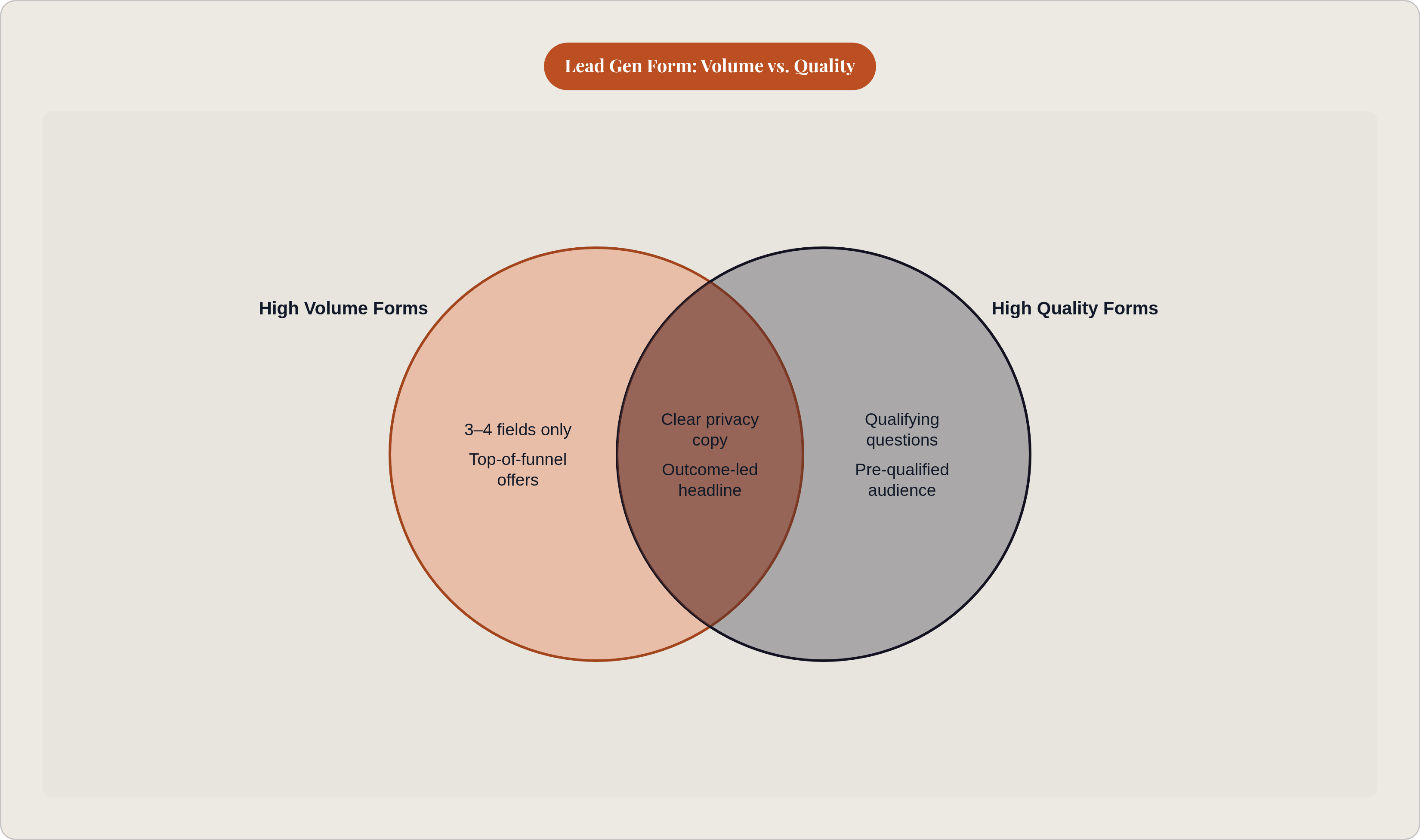
Most practitioners feel the tension between completion rate and lead quality as a fundamental conflict. High completion means low quality. Low completion means high quality. Pick one.
That's mostly a self-inflicted problem, and it comes from asking one form to do too much.
A high-friction form attached to a low-intent offer is the worst configuration possible. You get low volume because the form asks for too much, and low quality because the offer attracted the wrong people. Two-stage architecture solves this.
Stage one: low-friction form on a high-value content offer. Maximize completions. Build the list. Don't qualify here.
Stage two: nurture that list toward a higher-intent offer where longer forms and qualifying fields are appropriate. Demo request. Consultation. Strategy session. Now the friction is justified and the audience is warmer.
This tends to produce a lower blended cost per sales-qualified lead than gating every campaign directly on a demo request. Because you're not asking a cold audience to make a big commitment. You're earning the right to ask.
On CPL benchmarks: B2B campaigns targeting mid-market buyers should expect roughly $60 to $120 per Lead Gen Form lead. Enterprise campaigns targeting senior buyers commonly run $150 to $250 or more. These are reference points for judging whether your form is working, not numbers to minimize at all costs. The metric that actually matters is MQL-to-SQL conversion rate. LinkedIn leads convert to sales opportunities at roughly 10 to 15%.
What happens after submission determines whether the form actually generates pipeline
Here's where a lot of good forms go to die.
LinkedIn stores lead data for 90 days. The default export method is a manual CSV download. If someone downloads that CSV once a week, every lead in that batch is already days old before anyone reaches out. Speed to first contact is a direct multiplier on lead value. The longer the gap between submission and outreach, the lower the conversion probability.
Real-time CRM sync isn't an enhancement. It's the operational baseline. Native integrations exist for the major CRM platforms. Third-party tools can bridge the gap for others. This should be set up before the first campaign goes live, not after you notice that leads are going cold.
When a form is submitted, three things should happen immediately:
- Sales receives an alert.
- A nurture email from the offer hits the lead's inbox.
- A next-step CTA (calendar link, follow-up offer, whatever fits the funnel stage) is ready.
One more note on attribution, because it affects how you evaluate form performance. Lead Gen Forms don't send users to your website. Last-touch attribution models can't see the form as a touchpoint. If your attribution setup is last-touch, LinkedIn's contribution to pipeline will look smaller than it is. Multi-touch or first-touch frameworks give you a more accurate read.
The form is the beginning of a handoff, not the end of a campaign. Completion rate is what you optimize. Pipeline generated is what you measure. Those aren't the same metric, and conflating them is how good form design produces disappointing results.