LinkedIn Ads Agency Onboarding Process and Timeline
The four-phase LinkedIn onboarding process that prevents campaigns from launching on guesses.

I ran LinkedIn onboarding for enough B2B accounts that I can tell you the exact week things go sideways before you finish describing the client. It's usually week two. Someone's still waiting on IT to grant Campaign Manager access, the audit gets rushed to compensate, and now the whole engagement is built on a foundation nobody actually checked.
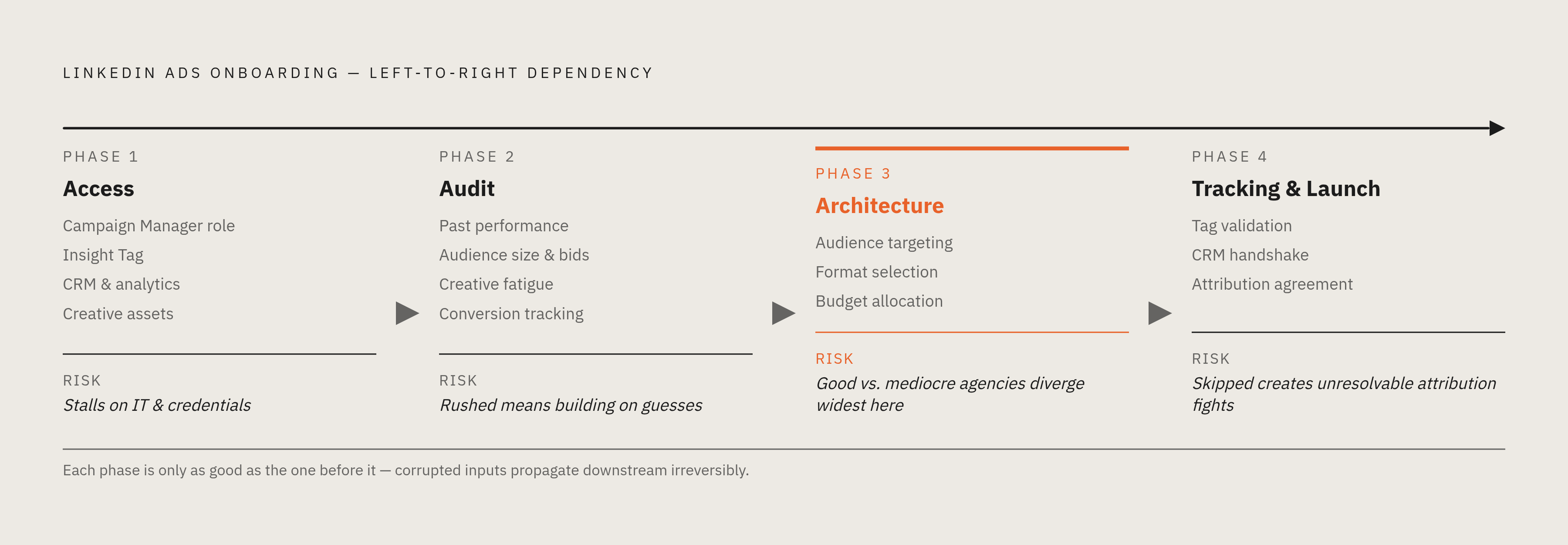
That order matters: access, audit, architecture, launch. Skip a step, or rush one to make up time, and the campaigns that go live are running on guesses instead of evidence. Here's what each phase actually looks like, how long it takes, and where I've watched it fall apart.
How long onboarding realistically takes, and why
Two weeks for a clean, single-channel LinkedIn engagement. Four to eight weeks for anything with more moving parts. That's what the work takes.
Onboarding doesn't stop when campaigns go live. The first month is a learning phase. LinkedIn's system needs time to gather data. Audience signals need time to clarify. A/B tests need enough volume to mean something. The real onboarding window runs well past launch day, whether anyone calls it that or not.
What speeds it up:
- Access, briefs, and approvals ready on day one
- An existing LinkedIn account without a mess to untangle first
- A clear answer, already agreed on internally, about who you're targeting
What slows it down:
- Credentials nobody can find for three days
- No Campaign Manager account at all
- Internal disagreement about the audience
- No conversion tracking in place yet
The expensive mistake is switching agencies or strategy mid-process. Every restart resets the clock on demand generation. I've seen companies do this twice in a year and then wonder why nothing's compounding.
Build the real timeline into your planning before you sign anything. If your board wants a pipeline lift in 60 days, have that conversation now — not after the contract's signed and someone's asking why week six looks like week one.
Phase one: getting access, and why it consistently stalls first
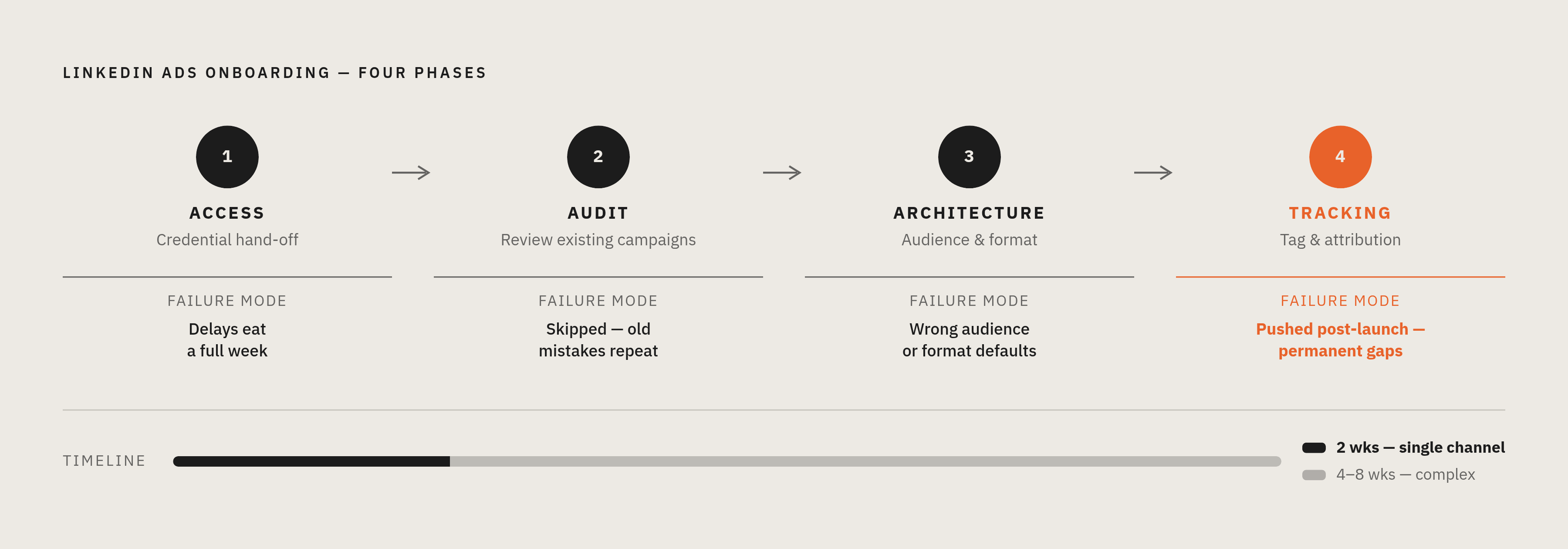
Nothing happens until the agency can actually see the account.
Access means:
- Campaign Manager, with a real campaign manager role (not viewer access, which is functionally useless for this)
- The Insight Tag confirmed live and firing correctly, not just installed
- CRM access, or at minimum an export path for matched audience uploads
- Analytics access (GA4, whatever you're using) for cross-channel context
- Any existing creative, brand guidelines, or past campaign exports
Credential handoff alone can eat a week. Not because the agency is slow. Because internal IT is sitting on a permissions request, or nobody's sure who actually owns the LinkedIn account anymore.
The client rarely sees this delay for what it is. The agency's ready. The holdup is sitting quietly on your side of the fence, and nobody names it until week two, when someone finally asks why nothing's launched yet.
Before day one, pre-provision access, confirm the Insight Tag is live, and figure out internally who actually owns your platform credentials. If you already have a Campaign Manager account, use it. Don't start from zero out of habit.
If an agency doesn't send a clear access checklist in the first day or two, that tells you something about how the rest of this is going to go.
Phase two: the audit — what a competent agency looks for in your LinkedIn account
The audit is the evidence everything else gets built on. Skip it, and you're building strategy on guesses that feel like facts because they came from somewhere.
Here's what a real one checks:
Past performance. Which objectives, audiences, formats got used, and how did they actually do? Not how did someone say they did.
Audience size. LinkedIn's delivery engine starts struggling below a certain audience threshold. Go too small and you get patchy delivery and CPMs that spike for no obvious reason. Most B2B work wants to sit within a mid-range audience band.
Bid strategy history. Was the account running maximum delivery, or did someone jump to target cost too early? Locking in cost controls before there's enough conversion data is one of the most common mistakes I've seen, and it's an easy one to make because target cost feels like the "smart" choice.
Creative fatigue. Performance can drop 40 to 60% after the first month if nobody rotates the creative. The audit should show whether that happened, and how badly.
Conversion tracking. Do LinkedIn's reported conversions match what actually shows up in the CRM? Or is Campaign Manager quietly overstating results because the attribution window doesn't match reality?
Attribution setup. LinkedIn's default window misses most of a typical B2B buying journey, which, per Dreamdata's research, runs many months and dozens of touchpoints. Too short a window means you're looking at a fraction of the picture and calling it the whole thing.
What should come out the other end is a written baseline — a document that says, specifically, why performance looked the way it did, and which parts are fixable with better structure versus which need a real rebuild.
No existing account to audit? Then this phase shifts toward competitive research, figuring out who your buyer actually is, and building tracking from scratch. Takes longer, but it also makes the scope of work honest from the start.
You should have this audit within the first week. If it's taking longer, the next phase is already behind.
Phase three: campaign architecture — audience targeting, format selection, and budget allocation
Clients almost never see this part directly, which is a shame, because it's where the gap between a good agency and a mediocre one is the widest.
Audience targeting. LinkedIn's real edge is precision: job title, seniority, company size, industry. No other platform gives you this at scale for B2B. For account-based work, you export your target list, upload it to Campaign Manager, layer job title filters on top. LinkedIn typically matches a strong majority of the companies on a list like that. Stay in that mid-range band, or you're fighting the algorithm instead of using it.
Format and objective. Most agencies default to Lead Gen Forms because they're easy and they generate volume. But volume isn't the point, and this is where I've seen good budgets go to waste. A cybersecurity program running this way can pull in 400-plus leads a month at a very low lead-to-opportunity rate — volume that looks impressive until you connect it to pipeline. That's a lot of leads going nowhere.
Thought Leader Ads deserve more attention than they get. According to osricdigital.com benchmark data, Thought Leader Ads drove 53% of all conversions on just 30% of total spend, at around $70 per conversion. It's underused, consistently, across the board.
Cold traffic, remarketing, and ABM audiences are not the same audience in different outfits. They need different formats and different goals. If an agency is running one identical campaign structure across all three, ask why.
Budget. LinkedIn CPCs generally run $5 to $15 for most B2B segments, higher in crowded verticals. Below a certain monthly spend, you can't generate enough conversions to optimize a bid strategy with any real confidence. If LinkedIn is running alongside Google, a common starting split for growth-stage companies is 60/40 in LinkedIn's favor, since Google tends to pick up demand that LinkedIn created in the first place.
Start bidding on maximum delivery to build volume. Only move to target cost once there's enough conversion data for that shift to mean anything.
What you should walk away with: named campaigns, defined audiences, objectives, formats, budget splits — an actual structure someone could build from tomorrow, not a strategy deck full of ideas that sound good in a meeting.
Phase four: tracking, attribution, and the CRM handshake before launch
Launching before tracking is validated is, in my experience, the single most reliable way to end up in an unresolvable argument about "what's actually working" three months from now.
Before anything goes live, confirm:
- The Insight Tag fires on every relevant page, including thank-you and confirmation pages, not just the homepage
- Conversion events in Campaign Manager map to actual business outcomes, not page views dressed up as conversions
- LinkedIn Campaign IDs pass into the CRM, so pipeline and revenue trace back to the campaign that actually generated them
- Everyone agrees, in writing, on which attribution window and model gets used for reporting
Skip this, and here's what happens: Campaign Manager reports hundreds of lead form submissions, and the CRM shows a small fraction of those as sourced opportunities. That gap isn't mysterious. It's a tracking setup that was never built right in the first place, and by the time someone notices, it's too late to fix retroactively.
B2B buying involves a lot of touchpoints over a long stretch. No single platform's attribution model captures the whole story, and a good agency says that out loud instead of letting you assume the dashboard is gospel.
Here's a question worth asking before launch: "Show me, live, on a screen, exactly how a converted lead flows from Campaign Manager into our CRM." If they can't do that in real time, the tracking isn't ready. Full stop.
Launch and the first 30–60 days — what "live" actually means
Launch is the point where you finally start collecting evidence instead of guessing.
Algorithm learning. LinkedIn's delivery system needs time to find efficient inventory in your audience. Early CPMs and CPCs tell you almost nothing about steady-state performance, so don't panic (or celebrate) in week one.
Creative observation. Which formats and messages are getting engagement, and which are quietly burning budget with nothing to show for it? The first rotation call gets made here.
Conversion validation. Are leads actually landing in the CRM? Is sales following up? A broken handoff at this stage wastes every hour spent on the phases before it.
Bid monitoring. Maximum delivery still makes sense early. Shifting to cost controls too soon, on too little data, can stall a campaign before it gets a fair shot.
Set expectations honestly: LinkedIn typically takes one to three months to produce meaningful early signals, demos, qualified leads, real conversations. Pipeline impact often takes longer than that.
A good agency gives you a written read on the first 30 days: an actual interpretation of what the numbers mean, and what should change because of them. Not a dashboard screenshot with a "great progress!" note attached. A weaker agency reports impressions, clicks, and platform-side conversions and stops there, never connecting any of it back to pipeline.
One more thing worth checking: a written project roadmap within 48 hours of kickoff, with 30/60/90-day milestones, named owners, clear success criteria. If that document never shows up, that tells you something about how the rest of this is going to run.
Where LinkedIn Ads agency onboarding most commonly breaks down
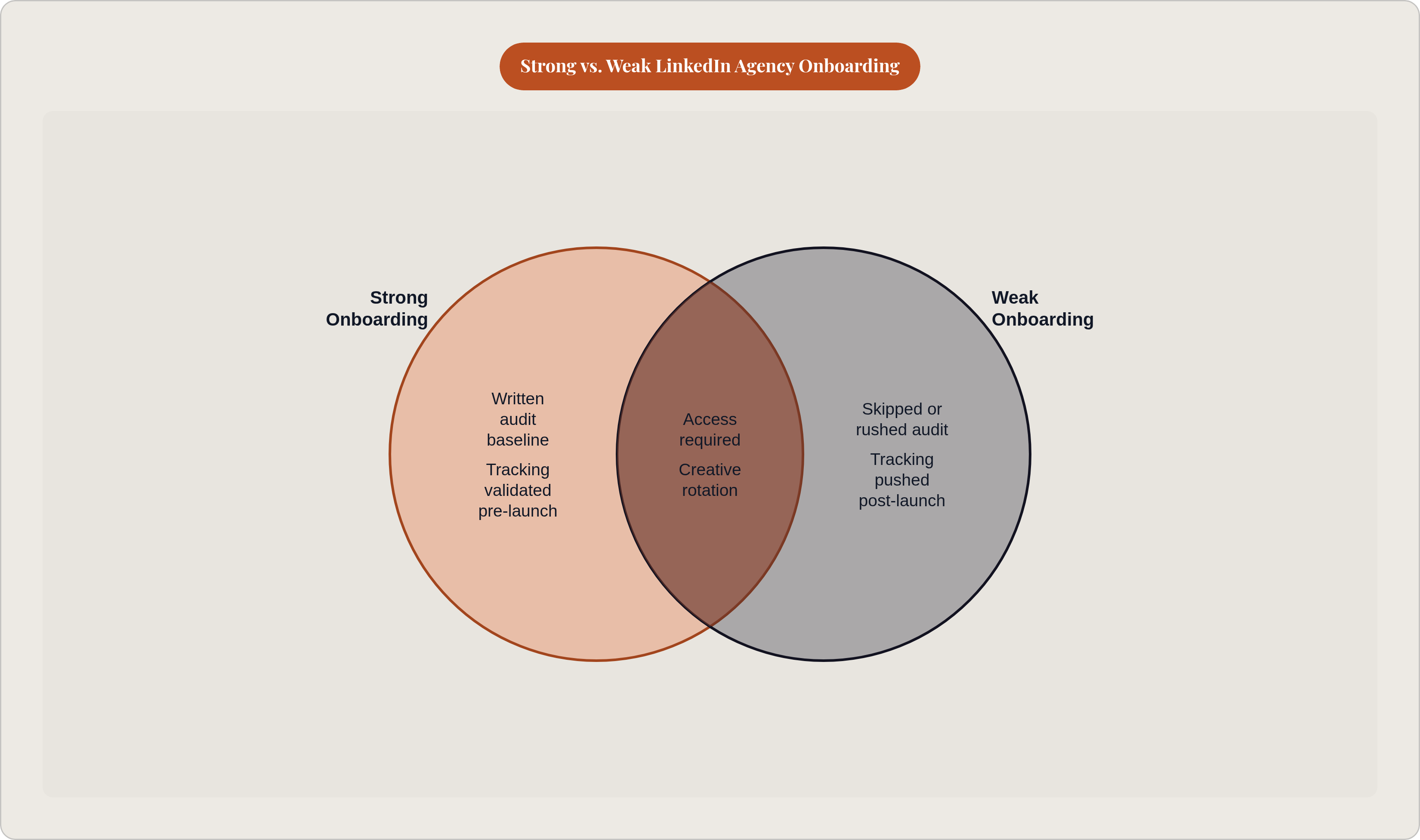
Same failures, over and over, in the same handful of spots. Most of them are visible early, before they get expensive.
- Access delays that are actually the client's fault. Slow credential handoff is the most common stall point, and agencies often absorb blame for delays that were never theirs to own.
- Architecture built without an audit. Skip it or rush it, and the new campaigns repeat the old account's mistakes instead of fixing them.
- Audiences sized wrong. Too small for LinkedIn's algorithm to spend efficiently, which means spotty delivery, inflated CPMs, and data you can't trust.
- Tracking pushed to "after launch." This is the most predictable source of attribution fights I've seen. Fixing it retroactively leaves a permanent gap in the record.
- Creative left alone past month one. That 40 to 60% drop from stale creative is a documented pattern, per digitalscouts.co's B2B paid media research. Agencies without a rotation schedule built in won't catch it in time.
- Reporting that never touches pipeline. Impressions, clicks, and lead form counts, with nothing connected to CRM-sourced opportunities, means nobody's actually managing toward the outcome you hired them for.
- The reset habit. New agency, new strategy, new clock. Every restart resets the demand-gen timeline, and the cost of switching is almost always higher than it feels in the moment of frustration.
What the onboarding process looks like when execution is delegated rather than managed
The traditional agency model runs on human hours. Those hours are finite, they depend on handoffs between people, and they reset every time an account manager leaves or gets reassigned. If you've been through an agency switch, you know the feeling: three weeks of re-explaining context that used to be common knowledge.
There's a different way to structure this. Software handles the ongoing execution work (bid monitoring, creative rotation triggers, audience performance checks, conversion tracking) while a named person owns the judgment calls that actually need a human: audience strategy, budget shifts, whether to restructure a campaign or just tune it.
What that changes, in practice:
- Access and the audit still have to happen. That critical path doesn't disappear. But the work after launch doesn't grind to a halt just because a human analyst is out sick or buried in five other accounts.
- Creative fatigue, bid strategy problems, attribution gaps get caught continuously, instead of getting saved up for next month's check-in call.
- Campaign history becomes a structured record: what worked, what didn't, which audiences actually converted. The next decision starts from that record, not a blank page and someone's memory.
Some tools are built this way, where software handles the research, campaign building, launch, monitoring, and optimization across Google and LinkedIn, while named individuals make the calls that need a person, and that person is who you hold accountable, not a rotating cast of account managers you've never met.
The pricing matters here too. A flat retainer, not tied to media spend, removes the incentive to recommend more budget instead of a better strategy, an incentive that shows up naturally the moment an agency gets paid a percentage of what you spend.
Regardless of who you work with, the questions stay the same: who has access, who ran the audit, who built the architecture, who validated tracking, who's accountable when something breaks after launch. The model changes who answers those questions. It doesn't change which ones actually matter.