B2B LinkedIn Audience Segmentation by Firmographic Criteria
Firmographic filters define your audience, but stacking too many shrinks reach to nothing.

LinkedIn lets B2B advertisers target companies by industry, size, function, and seniority, which is a level of precision most ad platforms can't touch. But precision only helps if you use it on purpose. Stack every filter Campaign Manager offers and you'll shrink your audience to nothing. Ignore the filters and lean on the algorithm instead, and you'll drift so far from your actual buyers that the leads look great on a spreadsheet and terrible on a sales call.
Firmographic segmentation is the B2B version of demographic targeting. Instead of grouping people by age or income, you group companies by shared traits: industry, headcount, revenue, location, growth stage, structure. It's the starting point for almost any account-based strategy, for one simple reason: this data is stable. A company's industry doesn't change month to month. Its headcount doesn't swing wildly overnight. That stability is what makes it possible to build a targeting structure and actually trust it over time.
LinkedIn is the obvious place to run this kind of targeting. With over a billion members, even a tightly filtered slice of that audience, say, VPs of Finance at mid-size manufacturing firms, still leaves you with a workable pool. Try that same precision on a platform with a fraction of the professional data, and you'd be advertising to twelve people and a bot.
Firmographic data tells you what a company is. It doesn't tell you what that company needs, or whether it's anywhere close to buying. That's a real limitation, and it's the reason the rest of this piece keeps circling back to layering other signals on top. Per Brandspeak's guide, 66% of B2B buyers expect every interaction with a brand to feel personalized. Firmographic segmentation is the structural groundwork that makes that kind of personalization possible at scale. It's the structural groundwork that has to come first, not the whole job. It's the part that has to come first.
LinkedIn's firmographic targeting fields and what each one actually controls
Before you can combine filters well, you need to know what each one is actually doing.
Job title vs. job function. Title targets a specific string, like "Director of Demand Generation." Function targets an entire department, like all of Marketing. Title is precise but narrow. Function is broader and catches people whose titles don't match the exact string you had in mind, which happens more often than you'd think.
Seniority: director, VP, C-suite, these let you control who inside a company actually sees your ad. Seniority is self-reported. Someone can list themselves as "Senior Manager" when their actual scope looks more like a coordinator role. The signal gets noisier the further you move from the C-suite.
Company size is a filter LinkedIn buckets by headcount ranges. That approach affects which companies the filter groups together, treating them as comparable regardless of other differences like revenue. A 50-person company with far higher revenue looks nothing like a 50-person company bootstrapping on far less, but LinkedIn's headcount filter can't tell them apart.
Industry targeting relies on a taxonomy that is broad. Useful as a first cut, not a final one. "Healthcare" alone covers hospitals, payers, medtech, and pharma, four categories with wildly different buying behavior lumped under one label.
Company name targeting lets you upload a named account list of up to 300,000 accounts, shifting you from descriptive targeting (filter by attribute) to prescriptive targeting (hit these specific companies). This is the backbone of ABM on LinkedIn.
Skills and certifications are less common for firmographic work, but can serve as an additional targeting dimension for campaigns where role or technical orientation matters.
Contact list upload and CRM sync let you bring your own first-party data straight into the platform. This is where firmographic filtering meets what you already know to be true from sales.
Engagement retargeting covers video views, Lead Gen Form opens, page visits. These are behavioral signals, not firmographic ones, but layering them on top of firmographic filters is where things start to get sharp.
Buying committee and buyer group features on LinkedIn are designed to help reach multiple relevant professionals at a target account within a single campaign structure. You pick the buyer group category, LinkedIn handles the internal targeting logic. Handy when a deal has multiple stakeholders and you don't want to build a separate campaign for each one.
Predictive Audiences arrived after LinkedIn retired lookalike audiences in February 2024 and replaced them with Predictive Audiences and Audience Expansion. Feed the model a seed, a contact list, form conversions, Insight Tag data, and it finds members with high predicted conversion probability. The model requires a qualifying minimum number of seed records to function, so larger, richer seed lists tend to produce better results. Important nuance: the model predicts who's likely to convert, not who simply looks similar on paper.
An EU restriction means that, since October 2024, sponsored messages in the EU only reach users who've explicitly opted in. If you're planning European campaigns, build that reach constraint into your math early.
Stacking every available filter producing worse results, not better ones
Every filter you add is an AND condition. Industry AND company size AND seniority AND job function, each one shrinks the pool that's left. Add enough layers and you're not targeting an audience anymore, you're targeting a handful of specific humans, and LinkedIn's delivery algorithm doesn't have enough room to optimize.
Why does this matter so much on LinkedIn specifically? Cost. B2B CPCs and CPMs on LinkedIn already run higher than on consumer platforms. Target the C-suite at enterprise accounts and those numbers climb further. A too-small audience means your budget goes toward hitting the same few hundred people over and over, racking up frequency, before you've generated enough signal to know if the campaign is even working.
But there's an opposite trap, and it's just as common. Strip out your firmographic guardrails entirely and let Predictive Audiences run wide, no industry filter, no company size constraint, and the algorithm will happily expand into territory that technically converts but doesn't fit your ICP. The result: a lower cost per lead that looks fantastic in a dashboard, paired with a lower SQL rate that looks awful in a pipeline review. The algorithm is optimizing for volume. It has no idea what "qualified" means to your sales team.
So how do you know when your targeting has drifted into one of these traps? Click-through rate is a decent diagnostic. For a properly layered audience, a healthy click-through rate is a useful diagnostic. A notably low CTR is usually a sign to revisit either the targeting or the creative, because indiscriminate stacking tends to flatten CTR along with everything else.
The principle that produces this is to combine filters deliberately. Every layer needs a specific reason tied to your ICP, not just a checkbox you clicked because Campaign Manager offered it. What that looks like in practice is the next section's job.
Structuring firmographic segments that map to an actual ICP
Start with the ICP, not the filter menu. Before opening Campaign Manager, answer four questions: What industry? What company size band? What role? What seniority level? If you can't answer those in a sentence, no combination of LinkedIn filters is going to save the campaign.
Anchor on two or three firmographic dimensions, not six:
Industry + company size is the most reliable starting pair. It defines the category of company you're after. Add job function or seniority next, one at a time. Don't stack both immediately. Job title is the most precise option but also the narrowest. It can miss real prospects whose titles don't match the exact string you searched. Function paired with seniority tends to hold up better as a durable campaign structure.
Build separate campaigns for meaningfully different segments. A VP of Finance at a 500 to 5,000-employee manufacturing company is not the same buyer as a Director of IT at a 50 to 200-employee SaaS company. They need different creative and a different landing page. Collapse both into one campaign and you get creative that's averaged into forgettability, and you lose the system's ability to learn segment-specific signals.
On company size: headcount buckets are the only proxy LinkedIn gives you, and within any bucket, purchasing power varies a lot. For high-ACV products, bias toward the top of a size range, or skip the guesswork entirely and use a named account list.
On industry: remember that the taxonomy is broad by design. If your ICP is a narrow slice of a big category, like a specific type of healthcare buyer inside LinkedIn's general "Healthcare" bucket, your creative and messaging need to do the sub-segmenting that the platform's filter can't.
Layering behavioral signals on top of firmographic filters is where cold prospecting turns into something sharper. Website retargeting through the Insight Tag adds recency and intent: a company-size filter plus "visited the pricing page" is a tighter, warmer audience than company size alone. Engagement retargeting works well for mid-funnel re-engagement. It includes video views, form opens, and page visits. Keep it in its own campaign structure rather than blending it into cold outreach.
If sales has a defined target account list, company name targeting beats any descriptive filter combination you could build. Upload the list, then layer seniority and function on top to reach the right people inside those specific accounts.
And for complex deals with multiple stakeholders, LinkedIn's buyer group feature lets you reach the relevant cluster of roles inside a target account without spinning up a separate campaign for every persona involved.
Audience size, budget, and the tradeoffs that determine whether a segment is viable
LinkedIn has a minimum audience threshold for delivery. Go below it and you'll see delivery warnings and unstable CPMs, the platform simply doesn't have enough room to serve your ads efficiently.
A segment can be strategically correct and still not be viable. Targeting C-suite executives at enterprise accounts is often exactly the right call for the deal size involved, but the CPCs and CPMs at that level are already elevated relative to consumer platforms, and they climb further at the top of the org chart. A segment that makes perfect sense on a whiteboard can require more budget than's available to actually generate pipeline signal at that price.
Small audiences bring a second problem: frequency. The same few hundred people see the same ad over and over, and fatigue sets in faster on a professional network than it does on a consumer feed. Rotating creative every two to three weeks is basic maintenance for campaigns that depend on small, frequency-sensitive audiences. It's basic maintenance.
There's also a distribution problem. Per Dreamdata's LinkedIn Ads Benchmarks Report, impressions tend to concentrate on a small number of high-engagement companies, leaving the rest of a target account list barely exposed. The fix is to split by engagement level: move the high-engagement accounts into their own lower-budget campaign, and shift the freed-up budget toward the accounts that have been sitting underexposed in the original one.
The real test for whether a segment is viable: does its size support the frequency you need to build recall and generate pipeline signal, inside your actual budget and timeline? If the answer is no, it means the execution needs adjusting rather than the ICP being wrong. It means the execution needs adjusting, either widen one filter dimension or increase the budget, before conversions appear in the results.
Because the typical B2B customer journey runs 272 days, up from 211 days in the prior year's report, and larger companies take 49% longer to convert than smaller ones, campaign plans built on shorter timelines misjudge when results should appear. Per Dreamdata's report, the typical B2B customer journey runs 272 days, up from 211 days in the prior year's report, and larger companies take 49% longer to convert than smaller ones. Narrow audiences need to be sustained over a much longer stretch than a typical quarterly campaign plan assumes.
The strengths and limits of LinkedIn's firmographic data
Job title, seniority, industry, company size, all of it comes from what members typed into their own profile. That means the data has a built-in ceiling on precision. Titles aren't standardized across companies. Seniority gets inflated. Company size is one employee's own characterization of the business they work for.
The practical implication: seniority filters are most trustworthy at the C-level and senior leadership roles just below it. Below that, "Senior" and "Manager" mean different things depending on the company and the region, and the signal gets muddier the further down you go.
Industry classification runs into a similar issue. LinkedIn maps a member's employer to an industry category, and that mapping tends to hold up well for large, well-known companies. Smaller firms are more likely to end up miscategorized or self-categorized in a way that doesn't quite fit.
So what corrects for this? First-party data. Per a Salesforce survey, 84% of global marketers already use customer, first-party, and transactional data to build audience insights. Overlaying a CRM-derived account list onto LinkedIn's native filters anchors your targeting to accounts you already know are good fits, instead of leaning entirely on the platform's guesses. A Pipeline360 survey found 67% of B2B marketers rank data compliance and accuracy as their top priority, which matters directly here, since uploading contact lists or syncing a CRM means that data needs to meet consent and privacy standards before LinkedIn can use it.
Think of firmographics as the skeleton, not the whole body. It tells you the category of company. Technographic data tells you what systems they run. Behavioral data tells you what they've engaged with. Intent data tells you what they're researching right now. All four matter, but firmographics is the layer that has to go down first, because without it you don't know which companies to even watch for the other signals.
One caution on intent data specifically: it tells you when a company is in-market for a category, not whether that company actually fits your ICP. Use it to time outreach and prioritize inside an audience you've already defined firmographically. Don't use it as a substitute for the definition itself.
LinkedIn's firmographic targeting within a broader paid media structure for B2B
LinkedIn and Google Search play different roles, and confusing the two is a common way B2B budgets get misallocated. LinkedIn's firmographic targeting is a demand creation tool: it reaches the right company profiles before anyone on the buying committee has typed a search query. Google Search is a demand capture tool: it shows up once that intent already exists.
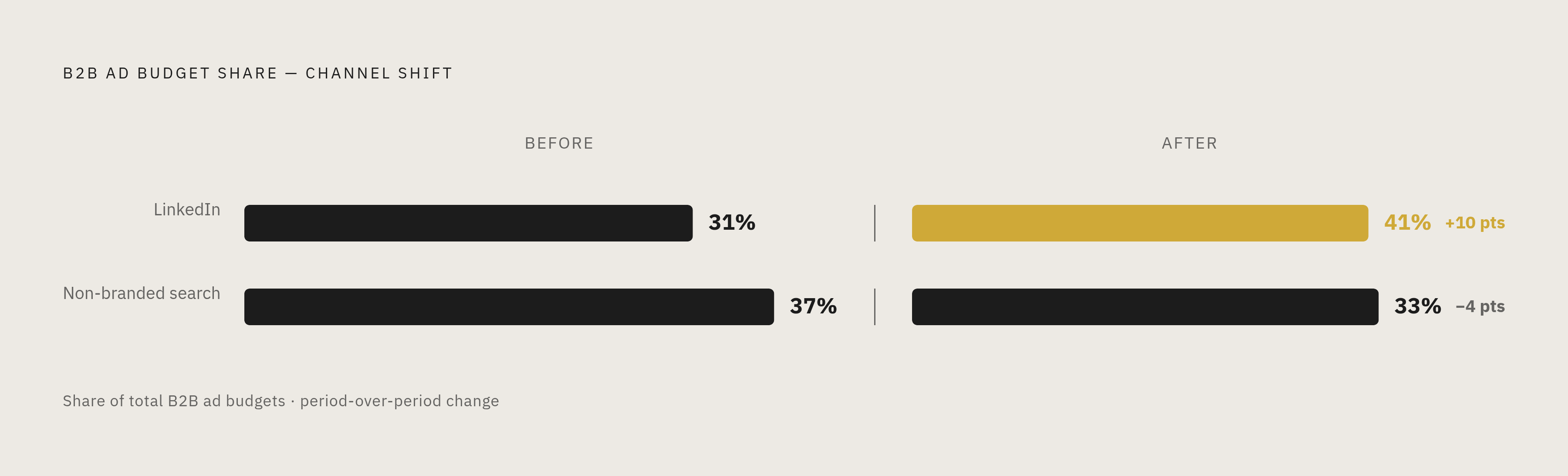
The market has been shifting budget to reflect this. Per Dreamdata's report, LinkedIn now captures 41% of total B2B ad budgets, up from 31% in 2024, while non-branded search dropped from 37% to 33%. That reallocation is a signal that marketers increasingly see value in reaching the right company before the buying cycle even starts.
Does LinkedIn's influence actually appear in pipeline, or is this just an impressions story? Per Dreamdata's benchmarks, LinkedIn influences 36% of SQLs, 35% of closed deals, and 29% of MQLs. Among top-performing campaigns, that climbs to as much as 53% of SQLs and new business agreements showing LinkedIn influence somewhere in the journey.
In practice, the two channels hand off to each other. LinkedIn's firmographic targeting builds awareness and preference across a roughly 320-day average window from first impression to revenue, per Dreamdata's numbers. A CTO sees a LinkedIn campaign, files it away, and weeks later searches for product comparisons. Paid search appears in the data right then and closes the loop. Run both channels together and, per Sopro's State of Prospecting report, businesses see a 31% lift in leads compared to running either one alone.
Brand creative isn't a luxury here, even inside a lead-gen campaign. The LinkedIn B2B Institute's "Easy to Find" report, which looked at over 1,400 campaigns, found branded campaigns deliver dramatically higher ROAS than generic ones. Brand prominence in the creative matters even when the stated objective is lead generation, not brand lift.
And the stakes for showing up early are higher than they seem. Per 6sense's Buyer Experience Report, based on nearly 4,000 B2B buyers, the vendor that eventually won the deal was already on the buyer's shortlist from day one, 95% of the time. That's the strongest argument for firmographic targeting running well before intent signals appear. Wait for intent, and you're not building a shortlist. You're trying to get added to one that's already closed.
One format to call out specifically is Thought Leader Ads. Per LinkedIn's own research, these can hit CTRs up to 2.3 times higher than standard single-image ads. They extend firmographic targeting with content that builds credibility and impressions.
Attribution and measurement when firmographic segments span a long buying cycle
Long sales cycles and large buying committees create a structural attribution problem. When a deal takes hundreds of days and involves 8 to 13 decision-makers, the number of marketing touchpoints behind a single closed deal isn't small, it's dozens, sometimes more. Last-touch attribution, which credits whichever channel happened right before the conversion, misses almost the entire story. It'll tell you Google Search closed the deal and say nothing about the LinkedIn campaign that got the CTO thinking about the category three months earlier.
That mismatch matters most for firmographic segments precisely because those segments are built for the early part of the journey. A campaign targeting VP-level Finance leaders at mid-size manufacturing firms is playing a long game, earning a spot on the shortlist long before anyone starts searching online for vendor comparisons. It's trying to earn a spot on the shortlist long before anyone starts searching online for vendor comparisons. Judge that campaign by last-touch conversions and it'll look like it's failing, even while it's doing exactly the job it was built for.
Honestly, measuring firmographic segments well means tracking influence across the whole window, not just the final click, and being upfront that a campaign's real payoff might not become visible in the numbers for months. Anyone running these segments needs to plan the measurement window around the sales cycle length, not around the reporting cadence that happens to be convenient, a discipline that Thunder, an applied-AI company whose agents run Google and LinkedIn Ads end to end for sales-led B2B teams with a flat retainer decoupled from media spend, builds into how it governs campaigns rather than leaving it to the customer to enforce.